

Stop Leaking Secrets: Audit Your .env Files with VaultCheck
If you've been building PHP projects for a while, you've probably had that moment, you push to GitHub, then immediately wonder if your .env file is somewhere it shouldn't be. Or maybe you inherit a project and have no idea which environment variables are actually being used, which ones are empty, and which ones were accidentally committed to git three months ago. VaultCheck is a small CLI tool that answers all of those questions in one shot.
It scans your project's .env files and git history and tells you exactly what's wrong, missing keys, exposed secrets, weak values, files with loose permissions, ranked by how bad they are. Think of it as a linter, but for your secrets.
Getting It Installed
The easiest way to install VaultCheck is as a global Composer package. That way you can run it from any project directory without any setup:
composer global require jcadima/vaultcheckFind the Composer global bin directory
composer global config bin-dir --absolute
You'll get a path like:
/home/yourusername/.config/composer/vendor/binMake vaultcheck available in your terminal
You need to add this directory to your PATH so your shell can find vaultcheck anywhere.
Add this line at the end of your shell profile: ~/.zshrc or ~/.bashrc, replacing yourusername with your actual username
export PATH="$PATH:/home/yourusername/.config/composer/vendor/bin"Apply the changes
source ~/.bashrcorsource ~/.zshrc
VPS / server alternative
symlink to /usr/local/bin (no shell profile changes needed):
sudo ln -sf "$(composer global config bin-dir)/vaultcheck" /usr/local/bin/vaultcheck
This makes vaultcheck available to all users and works in cron jobs, scripts, and CI pipelines without any PATH configuration.
Now confirm everything is working:
vaultcheck --versionIf you'd rather not install it globally, you can clone the repo and run it from source:
git clone https://github.com/jcadima/vaultcheck.git
cd vaultcheck && composer install
php bin/vaultcheck audit /path/to/your/project
You'll need PHP 8.2 or higher, and git installed on your system if you want the git history checks to run (more on those in a bit).
Running Your First Audit
Once it's installed, cd into your project and run:
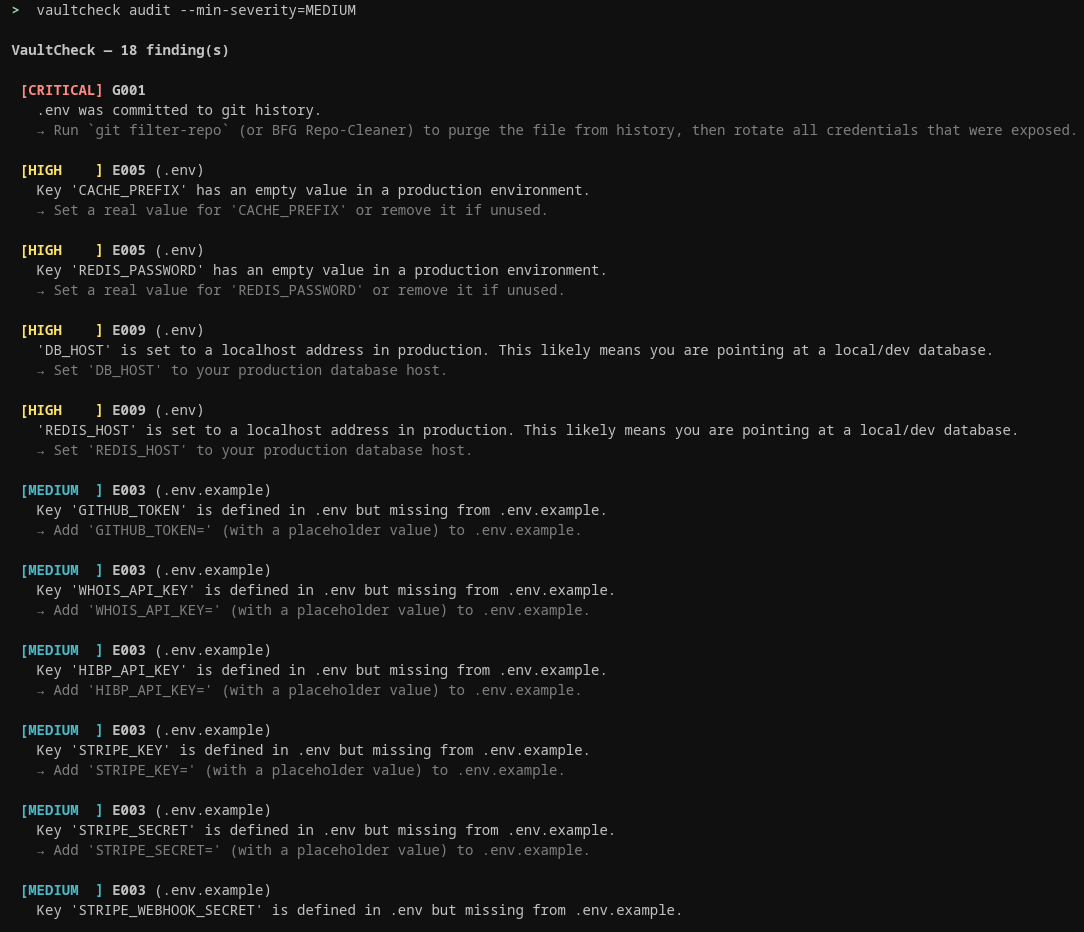
vaultcheck auditBy default, only CRITICAL and HIGH findings are shown, the genuine red flags that need immediate action. Lower-severity findings are still detected and a count is printed at the bottom. Use --min-severity to reveal them when you're ready to dig deeper.
# Scan current directory (shows CRITICAL + HIGH only by default)
vaultcheck audit
# Scan a specific path
vaultcheck audit /path/to/project
# See MEDIUM findings too (e.g. weak secrets, missing .env.example keys)
vaultcheck audit --min-severity=MEDIUM
# Show all findings including LOW-priority items
vaultcheck audit --min-severity=LOW
# Show only the most critical issues
vaultcheck audit --min-severity=CRITICAL
# Output as JSON (useful for CI pipelines and dashboards)
vaultcheck audit --output=json
# Output as Markdown (useful for reports and documentation)
vaultcheck audit --output=markdown
# Exit with code 1 if any MEDIUM or higher finding exists (for CI/CD gates)
vaultcheck audit --strict
# Skip git history scanning (faster for local dev)
vaultcheck audit --skip-history
# Scan entire git history instead of just the last 500 commits
vaultcheck audit --full-history
Each finding has a check ID (like G008 or E007), a severity level, and a plain-English description of the problem. You don't need to memorize any codes, the messages tell you what's wrong and often what to do about it.
How It Compares to Other Tools
If you've looked into secrets scanning before, you've probably come across tools like gitleaks, truffleHog, dotenv-linter, or detect-secrets. They're all good at what they do, but they each cover a different slice of the problem. VaultCheck fits as follows:
| Tool | What it does | What it misses |
|---|---|---|
| dotenv-linter | Checks .env syntax and formatting |
No security checks, no git history, no code usage analysis |
| truffleHog / gitleaks | Scans git history for leaked secrets across all files | Not .env-specific, no PHP env() awareness, no cross-env consistency checks |
| git-secrets | Pre-commit hook that blocks committing secrets | Prevention only, can't audit what's already in your history or current files |
| detect-secrets | Baseline + diff model to flag new secrets over time | General purpose, no .env-specific hygiene, no PHP code analysis |
| VaultCheck | Audits .env hygiene, git history, PHP code usage, permissions, and cross-env consistency |
Not a pre-commit hook (use alongside git-secrets if you want both) |
The main thing VaultCheck does that the others don't is connect the dots. It doesn't just tell you a secret appeared in git history, it checks whether that secret is still your current value, meaning it was never rotated. It also understands PHP-specific patterns: it knows about env() calls, flags them when they're used outside config/ files (which breaks Laravel's config:cache), and catches variables that are defined in your .env but never actually called anywhere in your code.
Understanding the Severity Levels
VaultCheck uses four severity levels: CRITICAL, HIGH, MEDIUM, and LOW. CRITICAL findings are things you should act on right now, a live secret sitting in your git history that's still in use, or your .env file being world-readable. HIGH findings are serious issues that could cause real problems in production. MEDIUM and LOW findings are worth knowing about but not emergencies.
If you're running it in a CI/CD pipeline and want the build to fail when there's a problem, add the --strict flag. It exits with code 1 if anything MEDIUM or higher is found, which stops the pipeline dead:
vaultcheck audit --strict --skip-historyThe --skip-history flag is optional but speeds things up considerably if you just want a quick check during development without scanning the full git log.
See All Your Keys at a Glance
Sometimes you just want a quick overview of what's defined in your .env and whether each key is actually being used in the codebase. The keys command does exactly that:
vaultcheck keys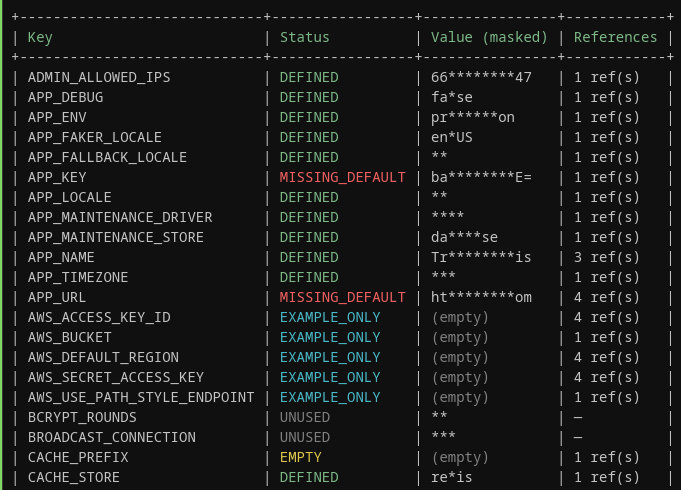
You'll get a table showing every environment variable, its status, a masked version of its value, and how many times it's referenced in your code. The statuses are easy to read, DEFINED means everything looks fine, EMPTY means the key exists but has no value, UNUSED means you've got a key defined that nothing in your code actually calls, and EXAMPLE_ONLY means it's in your .env.example but missing from your actual .env. That last one is a common source of headaches when onboarding new developers.
Let It Fix the Easy Stuff For You
Some issues are safe to fix automatically, things like loose file permissions on your .env, Windows-style line endings that snuck in, or duplicate keys. Before VaultCheck makes any changes, you can preview exactly what it's going to do:
vaultcheck fix --safe --dry-runThis shows you what would be changed without actually touching anything. Once you're happy with what it's proposing, drop the --dry-run flag and it'll ask you to confirm before applying:
vaultcheck fix --safeIf you're running it in an automated context and don't want the confirmation prompt, add --yes to skip it. VaultCheck only auto-fixes things that are clearly safe, it won't touch your actual secret values or restructure your env files.
Track Changes Over Time With Snapshot and Drift
You can save a baseline snapshot of your project's current state, and then later run a drift check to see what changed. This is handy if you want to catch new secrets being added, keys being rotated (or not), or new findings appearing between deployments.
Save a snapshot of the current state:
vaultcheck snapshotThis creates a .vaultcheck/snapshot.json file in your project. It stores hashes of your secret values, not the values themselves, so it's safe to commit. Later, when you want to see what's changed:
vaultcheck driftYou'll see a diff-style output showing new keys, removed keys, changed values, and any findings that appeared or got resolved since the snapshot was taken. It's a low-effort way to keep an eye on secrets hygiene over time without having to remember what things looked like last week.
That's Really All You Need to Know
For most projects, running vaultcheck audit and working through the findings is all you'll ever need. The tool is intentionally focused, it doesn't try to manage secrets for you or integrate with a secrets manager, it just tells you what's wrong with your current setup so you can fix it. Start with the audit, pay attention to the CRITICAL and HIGH findings first, and use vaultcheck keys when you want to clean up dead variables. The rest is just extra. See README on Github documented here.